
Known Participant
March 26, 2020
Answered

Convert Path Selection to Square Selection.

  • March 26, 2020
  • 3 replies
  • 867 views

Hello, I'm looking to convert a slection from a path into a 1:1 square.


I have an action that will pull from a path to make a selection.

I can manually hit "c" with a selection made and change the ratio to 1:1 to convert the selection shape into a square so the area selected is centered & cropped, however I can't recored this action because the crop measures and records the location of the crop and applies this to the action.

My selections will vary in location and I'd like to turn this into a Droplet to batch this process.


The selection should convert into a square that's the same overall width/height as the path selection.


Thoughts, please?


Thanks in advance!
This topic has been closed for replies.
Correct answer Stephen Marsh

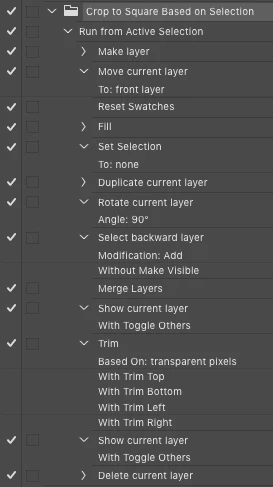
NoobNobods – Based on another recent topic thread, I believe that I have the answer in the form of an action, with no dependencies on a script, download link and screenshot below:


https://www.dropbox.com/s/9oi0yfxnh6fvtqr/Crop%20to%20Square%20Based%20on%20Selection.atn?dl=0


NOTE: Previously noted limitations apply regarding selection size vs. document size, so if the selection height is larger than the document width, then the crop may not be square or the crop may not take place. A script would be better, however, this may work for you if you "follow the rules" understanding the limitiations.

3 replies

Stephen Marsh
Community Expert
Community Expert
March 26, 2020

Thank you for the feedback NoobNobods – if somebody would like to offer a scripted solution I'd like to see it!

JJMack
Community Expert
Community Expert
March 26, 2020

You know the problem with the selection size and also know the additional problem your action has.


In a script its easy to get the selection or path bound as well as the documents.   I feel it would be a good exercise for you to see if you design a procedure the do the resize of the selection square taking its it position better than your action.  How to work out what side or sides to expand the selection to stay within the documents canvas.  And to abort the process when its not possible. You action process is a good start for it rotate the selection about its center. So two sides of the selection will expand. Top and bottom or left and right.  But there a problem when the layer rotate party off canvas the crop will not be the square one you want. For me it would be a lot of work that I would never use.  So I'm not going to code it.  You action only works when rotating  the selection 90 degrees stays one canvas.  A script could do a better job then that.  An action can not know if rotating a layer about it center will rotate part of the layer off canvas. If a script rotated the layers  and part rotates off canvas the if the layer is not wider or higher then the document canvas the script can align the layer to the document edge that it rotated past. then when you merge the two layers  Its bounds will be square and on canvas.

JJMack
Stephen Marsh
Community Expert
Stephen MarshCommunity ExpertCorrect answer
Community Expert
March 26, 2020

NoobNobods – Based on another recent topic thread, I believe that I have the answer in the form of an action, with no dependencies on a script, download link and screenshot below:


https://www.dropbox.com/s/9oi0yfxnh6fvtqr/Crop%20to%20Square%20Based%20on%20Selection.atn?dl=0


NOTE: Previously noted limitations apply regarding selection size vs. document size, so if the selection height is larger than the document width, then the crop may not be square or the crop may not take place. A script would be better, however, this may work for you if you "follow the rules" understanding the limitiations.

Known Participant
March 26, 2020

Works perfect, thank you Stephen!

JJMack
Community Expert
Community Expert
March 26, 2020

Please expand your action in the action palette so all the recorded steps and step setting are visible and post a screen capture of your action.  I can not follow what you are doing  from what you wrote. A path can be converted into a selection by an action  which can have any the shape the path had.  I have not idea of how you manually modify the selection to be a square selection. C is the shortcut for the crop tool and if there is an active selection the crop tool will default to the bounds of the selection which may or may not be square. You would have to manually adjust the crop tool to make the crop square. And you would need to use your brain the decide how you want to adjust the crop to square.   An Action can not use logic like that.  A script can use logic so a script can get the selection bounds and to know its aspect ratio.  You could add additional logic to set the selection to be square based on the original path aspect ratio and location then crop.  You would need to take care to make the selection within the document canvas else you will add canvas and the crop will have boarders.  You need to script what you want to do. You can use a script in an action so you cam most likely make a droplet from an action the uses your cropping script.  There is a big problem that a selection may not be able to be made square by adjusting the shorter side to be equal the the longer side and remain within the document canvas. There are two aspect ratios and sized the selection and the documents. If the select width of height is larger then the document other side the selection can not be made square within the documents canvas.

JJMack
Stephen Marsh
Community Expert
Community Expert
March 26, 2020

JJMack I believe that NoobNobods simply wishes to crop to square/1:1 ratio based on and centred on the current selection bounds. So if the selection bounds are portrait, resize the width to the height and vice versa for landscape.


As you mention, this will likely require a script, which the OP has come to the conclusion that actions can't do what is required by themselves... And again, as you also mention, what happens if the canvas width is smaller than the square width result (and the opposite for depth)?