

Inspiring
January 23, 2026
Answered

Converting EPS to BMP makes stroke thinner

  • January 23, 2026
  • 1 reply
  • 124 views

Hello,
The steps to convert EPS to BMP files using Photoshop are shown  as below. Some text is becoming thinner; is there a problem with one of the steps? thanks
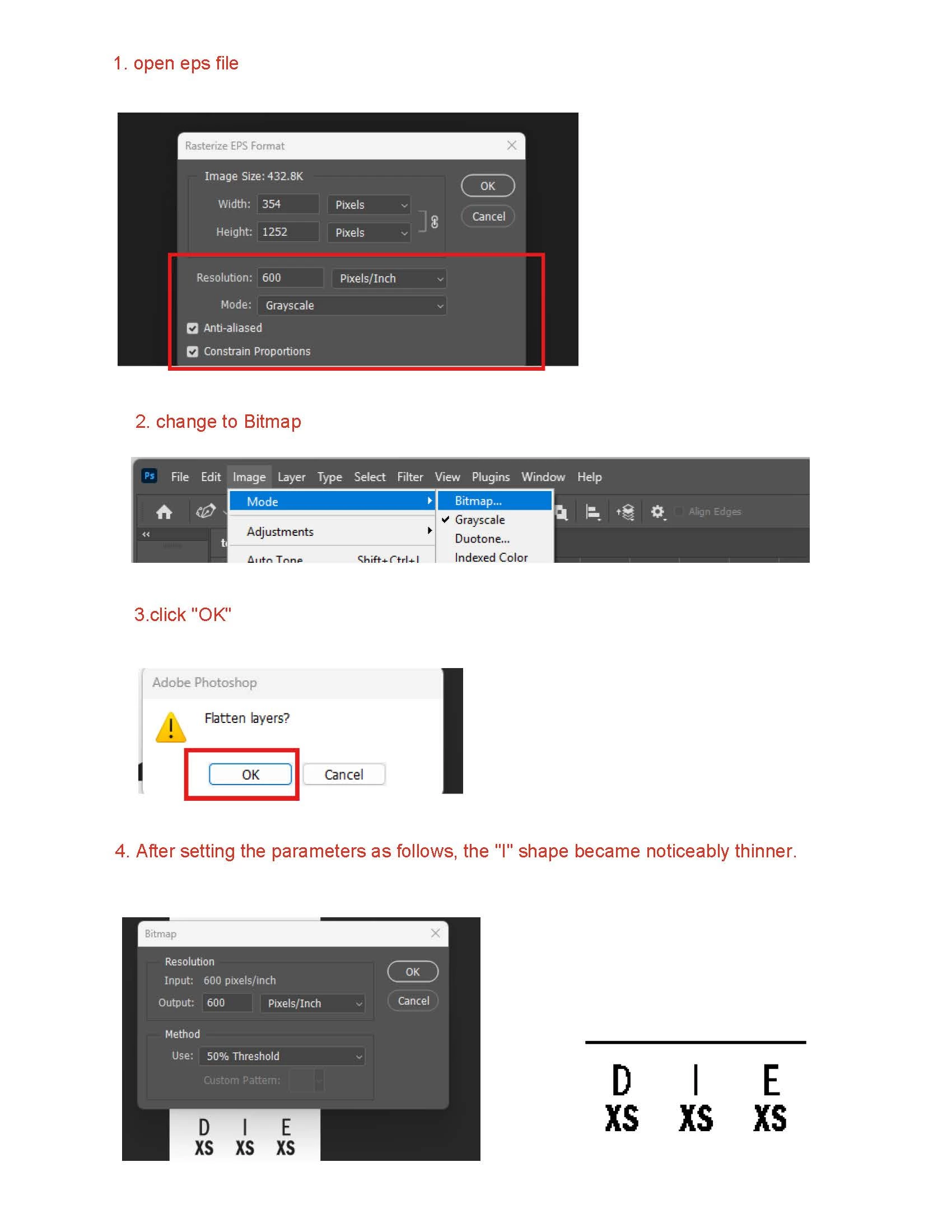

convert steps.jpg


Correct answer rui huang

If you like the results derived from the pdf better you may have to go that way. 

How many images do you have to process thusly? (It might be possible to automate saving pdfs off of the eps-files.)


Thank you so much for your help. I know how to solve the problem; outline stroke is needed before generating EPS.

1 reply

c.pfaffenbichler
Community Expert
Community Expert
January 23, 2026

Please try converting the eps with a higher resolution (1200ppi at least). 

Edit: And maintain that resolution when converting to bitmap. 


May I ask why you need to create a bitmap image from the (presumable) original vector data? 

rui huangAuthor
Inspiring
January 23, 2026

Your suggestion of setting 1200 will indeed solve the problem, but it will also cause other minor issues. I know the problem is caused by a white background in the EPS file, which I had to remove in Illustrator. Would it be possible to solve the problem without removing the white background and setting it to 1200?