


Participating Frequently
June 25, 2022
Answered

Copy and Paste into new document

  • June 25, 2022
  • 2 replies
  • 651 views

I am suddenly having difficulty copying and pasting into a new document. When I paste into a new document ti pixels are set to a different size than the original document. I copy merged, open a new document and the size of the document I am pasting into is different than the one I copied. This has never happened before. I am confused. I tried different approaches but nothing helps. Please help.

    This topic has been closed for replies.
    Correct answer J E L

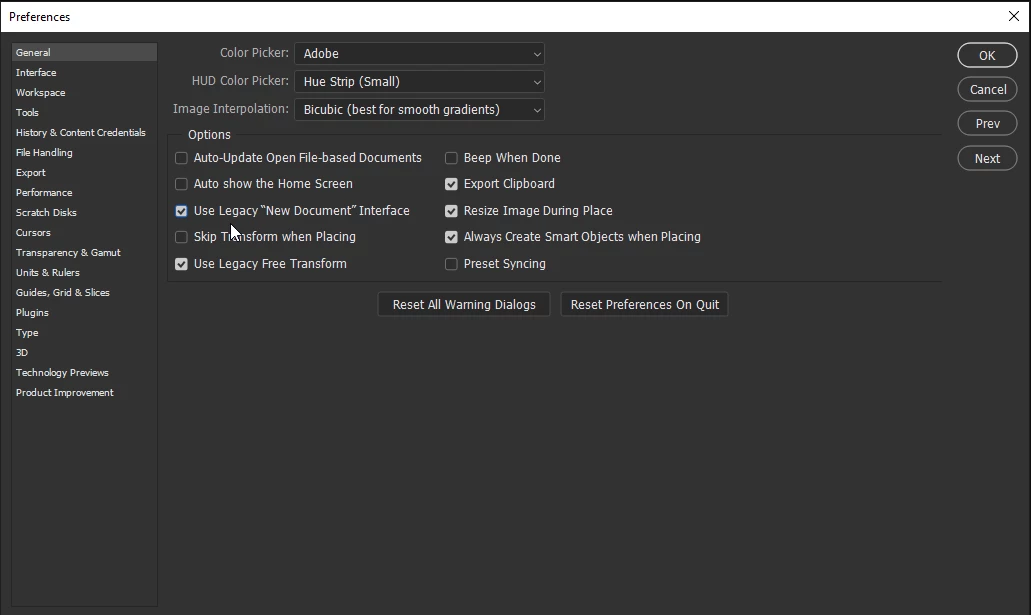
    Hi @patriciamcgrath1270, Please try checking Use Legacy "New Document" Interface in Preferences on the General tab. Is it working now? Let us know.


    2 replies

    J E L
    Community Expert
    J E LCommunity ExpertCorrect answer
    Community Expert
    June 25, 2022

    Hi @patriciamcgrath1270, Please try checking Use Legacy "New Document" Interface in Preferences on the General tab. Is it working now? Let us know.


    Participant
    June 30, 2022

    Worked for me! Thank you!

    John T Smith
    Community Expert
    Community Expert
    June 25, 2022

    When you post a question you always need to tell the Adobe program you are using
    There are MANY programs in a full subscription, plus other non-subscription programs
    Please post the exact name of the Adobe program you use so a Moderator may move this message to that forum

    Participating Frequently
    June 25, 2022

    I am using Photoshop 2022