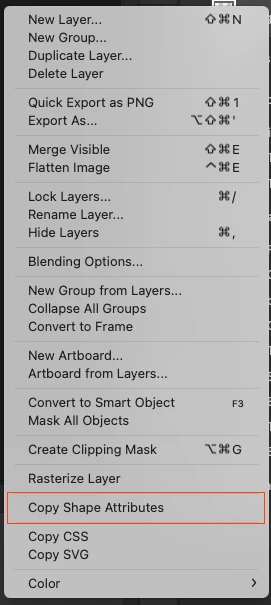
@Serge Malevanny – Here are the scripted versions to install in the application's Presets/Scripts directory. Once installed and Photoshop restarted, you can then add custom keyboard shortcuts to the scripts.
Copy Shape Attributes.jsx
/*
Copy shape attributes from the active layer to the clipboard
Stephen Marsh
v1.0 - 6th April 2025
https://community.adobe.com/t5/photoshop-ecosystem-bugs/copy-paste-shape-attributes-issues/idc-p/15253008
*/

#target photoshop;

try {
    s2t = stringIDToTypeID;
    (r = new ActionReference()).putProperty(s2t('property'), p = s2t('targetLayers'));
    r.putEnumerated(s2t("document"), s2t("ordinal"), s2t("targetEnum"));
    if (executeActionGet(r).getList(p).count) {
        if (app.activeDocument.activeLayer.kind === LayerKind.SOLIDFILL) {
            var idshapeClipboardOperation = stringIDToTypeID("shapeClipboardOperation");
            var desc257 = new ActionDescriptor();
            var idshapeClipboardOperation = stringIDToTypeID("shapeClipboardOperation");
            var idshapeClipboardOperation = stringIDToTypeID("shapeClipboardOperation");
            var idshapeCopyShapeAll = stringIDToTypeID("shapeCopyShapeAll");
            desc257.putEnumerated(idshapeClipboardOperation, idshapeClipboardOperation, idshapeCopyShapeAll);
            executeAction(idshapeClipboardOperation, desc257, DialogModes.NO);
        } else {
            alert("The active layer is not a Solid Fill layer!");
        }
    } else {
        // Selected layer check by jazz-y
        alert('No layer selected!');
    }
} catch (e) {
    alert('Error: ' + e.message);
}
Paste Shape Attributes.jsx
/*
Paste shape attributes from the clipboard to the active layer
Stephen Marsh
v1.0 - 6th April 2025
https://community.adobe.com/t5/photoshop-ecosystem-bugs/copy-paste-shape-attributes-issues/idc-p/15253008
*/

#target photoshop;

try {
    s2t = stringIDToTypeID;
    (r = new ActionReference()).putProperty(s2t('property'), p = s2t('targetLayers'));
    r.putEnumerated(s2t("document"), s2t("ordinal"), s2t("targetEnum"));
    if (executeActionGet(r).getList(p).count) {
        if (app.activeDocument.activeLayer.kind === LayerKind.SOLIDFILL) {
            var idshapeClipboardOperation = stringIDToTypeID("shapeClipboardOperation");
            var desc266 = new ActionDescriptor();
            var idshapeClipboardOperation = stringIDToTypeID("shapeClipboardOperation");
            var idshapeClipboardOperation = stringIDToTypeID("shapeClipboardOperation");
            var idshapePasteShapeAll = stringIDToTypeID("shapePasteShapeAll");
            desc266.putEnumerated(idshapeClipboardOperation, idshapeClipboardOperation, idshapePasteShapeAll);
            executeAction(idshapeClipboardOperation, desc266, DialogModes.NO);
        } else {
            alert("The active layer is not a Solid Fill layer!");
        }
    } else {
        // Selected layer check by jazz-y
        alert('No layer selected!');
    }
} catch (e) {
    alert('Error: ' + e.message);
}
- Copy the code text to the clipboard
- Open a new blank file in a plain-text editor (not in a word processor)
- Paste the code in
- Save as a plain text format file – .txt
- Rename the saved file extension from .txt to .jsx
- Install the .jsx file to run (see below)
https://prepression.blogspot.com/2017/11/downloading-and-installing-adobe-scripts.html




 AdChoices