Participating Frequently
June 14, 2025
Answered

copy stamp in PS 2025

  • June 14, 2025
  • 5 replies
  • 598 views

I have worked with PS CS6 for many years. In PS 2025 I have a problem with the copy stamp, for example when I want to stamp out a disturbing spot:
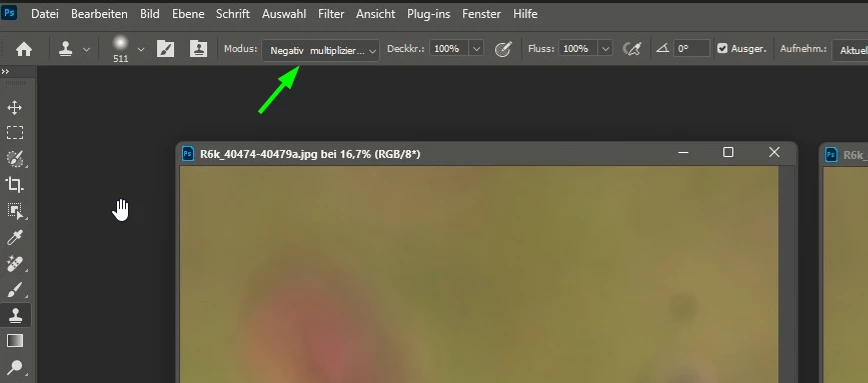
I marked a detail to be copied next to the disturbing spot. If I then paste it in the place of the stain, I get a light field. What is the reason for this?

Enclosed a picture for demonstration and the copy stamp parameters. The part within the circle was copied, the light fild next to it was the result after pasting.

With CS6 no problem (see foto "result with CS6").

Correct answer Ged_Traynor

@muputz change this option to normal, looks like you have it set to multiply

5 replies

muputzAuthor
Participating Frequently
June 14, 2025

Dear Ged_Traynor,

many thanks for your tip. This is the solution. I changed modus to normal. Now it works. No idea why the modus was set to multiply. At least not intentionally.

jane-e
Community Expert
Community Expert
June 14, 2025
quote

No idea why the modus was set to multiply. 

By @muputz


One possible reason is that you accidentally used the keyboard shortcut for multiply.


Result

Windows

macOS

Multiply

Shift + Alt + M

Shift + Option + M


i've moved your thread from bugs to discussions.


Jane


Ged_Traynor
Community Expert
Ged_TraynorCommunity ExpertCorrect answer
Community Expert
June 14, 2025

@muputz change this option to normal, looks like you have it set to multiply

Glenn 8675309
Legend
June 14, 2025

What area are you selecting to clone?

muputzAuthor
Participating Frequently
June 14, 2025

Dear Glenn,

enclosed a screenshot of the entire program with to pictures:

left before, and right after copy stamp

Glenn 8675309
Legend
June 14, 2025

Please post a screenshot of the entire program when you have this problem.  A full screenshot is like what you see below.