


Known Participant
January 15, 2026
Answered

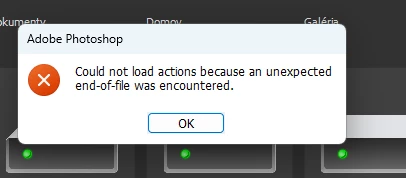
Could not load actions because an unexpected end-of-file was encountered

  • January 15, 2026
  • 5 replies
  • 284 views

There is something wrong with custom actions pannel. 2 workstations have same problem - resets all my custom actions after automatic update (i lost all my custom actions due they were not saved in separate folder). Day after on startup it happens again with error message: Could not load actions because an unexpected end-of-file was encountered. All actions are gone again.
874616i9C77217D58414ADD.png

Correct answer Aleke

Hi @tolyaasch, thanks for reaching out!

An end-of-file error usually means the file might have gotten corrupted on disk, although sometimes it’s just using the wrong extension and Photoshop can’t read it properly.
For actions specifically, some users have shared possible solutions in this thread: https://adobe.ly/3LJRgyW
Just a heads-up that the thread is quite old, so the suggestions may or may not still apply.
Thanks!
Alek

5 replies

AlekeCommunity ManagerCorrect answer
Community Manager
January 15, 2026

Hi @tolyaasch, thanks for reaching out!

An end-of-file error usually means the file might have gotten corrupted on disk, although sometimes it’s just using the wrong extension and Photoshop can’t read it properly.
For actions specifically, some users have shared possible solutions in this thread: https://adobe.ly/3LJRgyW
Just a heads-up that the thread is quite old, so the suggestions may or may not still apply.
Thanks!
Alek

*(If you mention me with an @, like @Aleke, I’ll get a notification and can respond faster.)*
tolyaaschAuthor
Known Participant
January 16, 2026

Dear @Aleke, thank you and I appreciate your message!
Please let me clarify my problem, and sorry for the misunderstanding — English is not my native language.
My problem is that I had to set up the Creative Cloud app to auto‑update on two computers, and this has happened to me more than once. I have 100+ custom actions created in Photoshop, and we adjust them daily for our needs.
After a PS update, especially when the year changes, those actions get deleted by the update. I do save my actions, but not every day (there are really hundreds of them), and it’s frustrating to lose them randomly.

It would be nice to have some sort of "save all actions" button at once function 🙂
Thank you.

tolyaaschAuthor
Known Participant
January 16, 2026

Update: After re-reading the mentioned thread, I tried selecting all actions in the Actions panel and clicking “Save Actions,” and it worked! 🙂 My bad — I thought it wouldn’t work that way (maybe I tried it years ago with older versions and it didn’t work). So that part is solved already.
But the second issue, where the update deletes the actions, is still there. 🙂
Thank you!