
Participant
Dec 24, 2023 12:25 PM UTC
Question

Could not load all the brushes because the maximum number of brushes have been loaded.

I have an older version of Photoshop (2015) on my computer wich works fine. But when I import my old brushes into my latest version of Photoshop, he has a problem. I receive a message described in the title.
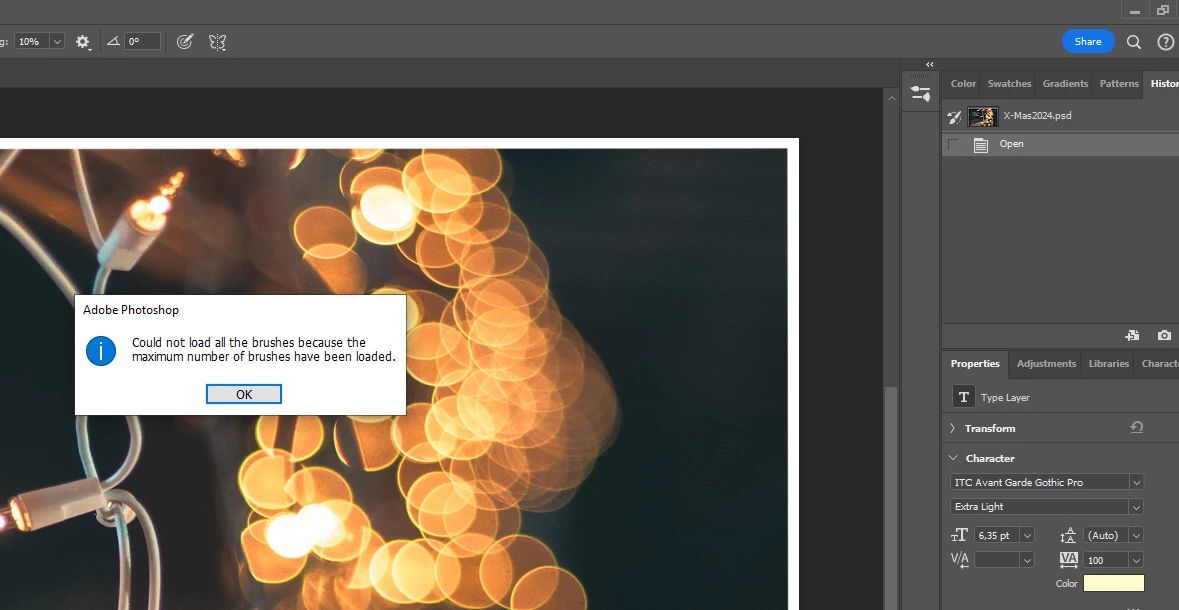


I have 57 folders with brushes and in each folder there are +/-  400 brushes for a total weight of 1,39 GB.

What I did is erase all existing brush folders and imported the old one ones but the last 4-5 folders he could not add for some reason.


How to remove this cap?

3 replies

Participant
Nov 12, 2025 12:36 PM UTC

2 years later and I'm suffering from the same problem, and I don't even have that much of brushs loaded. Need help. Discord, forum, nowhere to see an concrete answer.

Translate
jane-e
Community Expert
Community Expert
Dec 31, 2023 2:08 AM UTC

Tagging brush expert @Trevor.Dennis  again.


Jane

Translate
jane-e
Community Expert
Community Expert
Dec 24, 2023 2:41 PM UTC


@Davian Hill 


Adobe Community Expert @Trevor.Dennis  works with a gazillion brushes, so I've tagged him to see if he has any ideas. It's the middle of the night in his part of the world, so he won't answer right away. Plus it's Christmas Eve.


Jane

Translate