Participant
February 3, 2021
Question

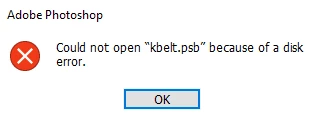
Could not open .psb file because of a disk error (windows 10)

  • February 3, 2021
  • 1 reply
  • 2495 views

Hello,

When opening a file which I have edited on the same computer I am using now with the same version of photoshop a few days earlier, I got a message saying I cannot open this because of a disk error. What can be done to recover the file? 
  • There is sufficent storage space on my computer.
  • I am using the latest version of photoshop.
  • File is 278 MB in size
This topic has been closed for replies.

1 reply

nikunj.m
Legend
February 4, 2021

Hi,


We're sorry about the trouble with Photoshop. Would you mind sharing the version of Photoshop you're using along with your computers operating system? Do you have the file saved on an external drive or a network drive? If yes, please try moving the file to your computers local storage (like the desktop) & check if you're able to open it.


If the issue persists, you can try to reset the preferences of Photoshop using the steps mentioned here: https://adobe.ly/2Qzc0K3

Please backup your settings prior to resetting the preferences. You can check: https://adobe.ly/2vNz6FG


You can also check out the conversation here: https://community.adobe.com/t5/photoshop/can-t-open-a-ps-file-could-not-complete-your-request-because-of-a-disk-error/td-p/9368470


Let us know how it goes!

Regards,

Nikunj

Participant
February 21, 2021

Hello Nikunj,

I am using photoshop 2021, and I have a single file stored on my external drive locally. I tried reseting my preferences, but it still did not work.