Participant
November 5, 2025
Answered

Create action to define a pattern using current file name - PS 2026

  • November 5, 2025
  • 2 replies
  • 130 views

Hi, I'm trying to create an action that defines a pattern, but when recording, the action will use the name of the document I used to record the action, not the document I'm currently using the action with. For example, if I record the action with a floral pattern named "flowers.psd", and then try to perform the action on a geo pattern named "geo.psd", the action will load the geo pattern into the pattern presets but will name it "flowers.psd". 


I found some previous answers with javascript templates to use, but they are all quite old and when I try to use them Photoshop tells me there are errors in the script. I'm familiar with implementing jsx files, but I'm not experienced in writing or editing, so I don't know how to troubleshoot the actual code. Would love some help here as this would save me soooo much time if I could make it work. Thanks! 


I am using Adobe Photoshop 2026 on Sequoia 15.6


This is the old thread I was referencing, neither of the codes here work for me: 

 

https://community.adobe.com/t5/photoshop-ecosystem-discussions/creating-a-photoshop-action-to-save-a-batch-of-images-as-patterns/td-p/4211974

Correct answer Jeff Arola

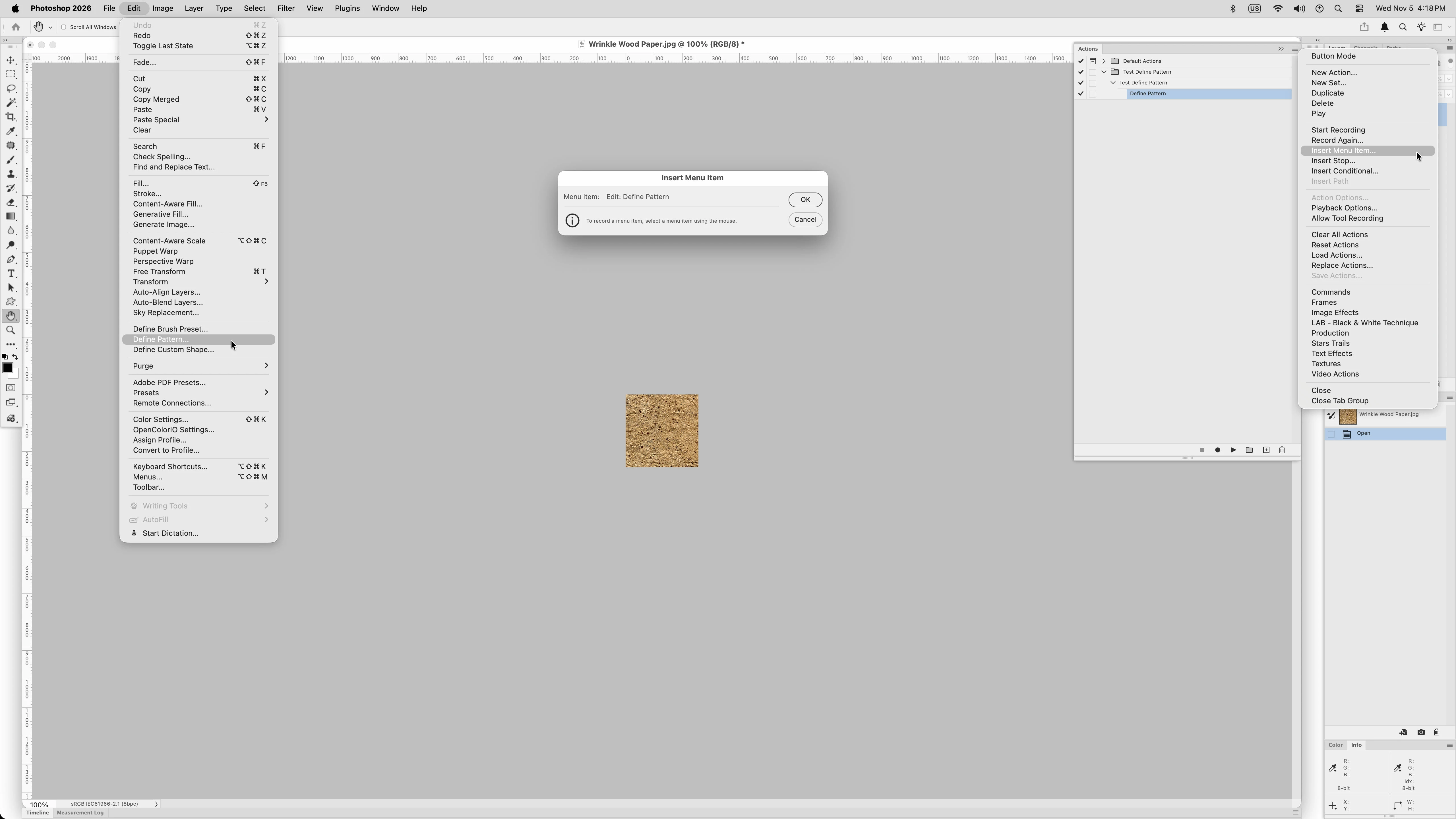
If you want the Define Pattern to use the Name of the current document, then record the Define Pattern action using Insert Menu Item, then when the Insert Menu Item dialog appears go to Edit>Define Pattern.


2 replies

Jeff Arola
Community Expert
Jeff ArolaCommunity ExpertCorrect answer
Community Expert
November 5, 2025

If you want the Define Pattern to use the Name of the current document, then record the Define Pattern action using Insert Menu Item, then when the Insert Menu Item dialog appears go to Edit>Define Pattern.


Participant
November 5, 2025

Holy moly that did it!!! THANK YOU SO MUCH you have saved me a ton of time

Genius
November 5, 2025

Do you have an open or save step in your action? If you change the names during a save especially, the action will include that name. You have to save without changing anything for it to not include the name.

Participant
November 5, 2025

Thanks for your reply! No, the only step in the action is "Make Pattern". Underneath the dropdown is: 


Using: Selection of current document

Name: "[filename].psd"


It's not a naming or saving issue, the problem is that the action will always refer to the filename it recorded first, not the filename that is currently open. I have found this kind of issue crop up in other instances of trying to make actions that utilize presets; the action will use the original filename each time instead of the current filename. It makes sense from a coding point of view, but it would be great to find a way to override. 

Genius
November 5, 2025

You might be able to script this to avoid the problem.