Known Participant
February 18, 2025
Answered

Create New Curve layer with Algorithm options (3) by script?

  • February 18, 2025
  • 2 replies
  • 448 views

hi everyone,

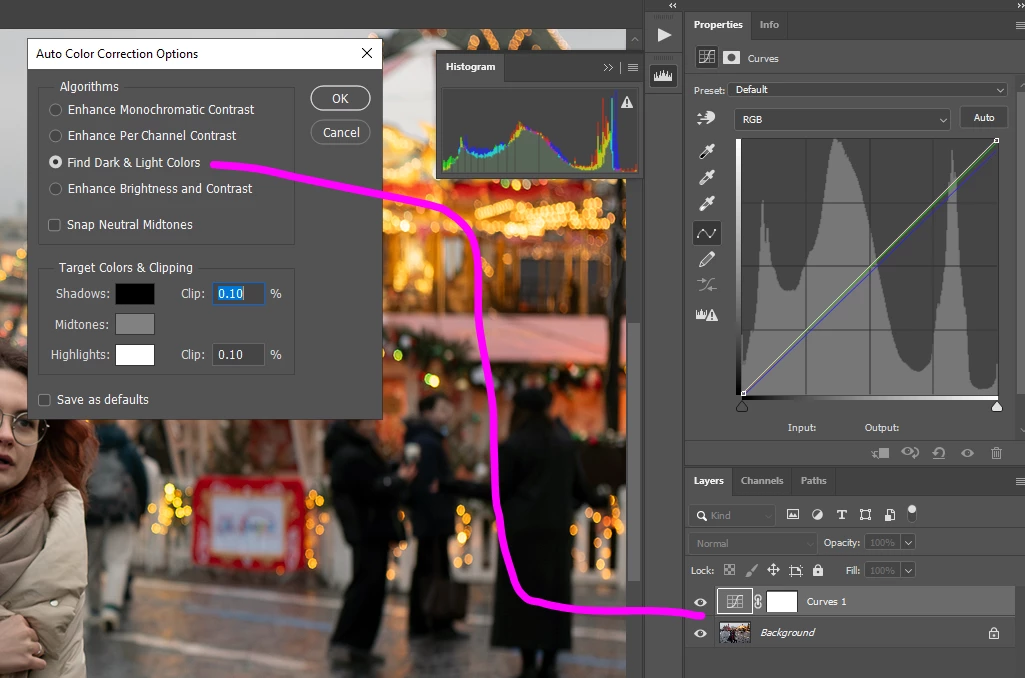
I want to create an adjustment curve layer with "Find Dark & Light color" algorithm option by using script.

The image is described as below.

Please guide me the exact command.

I appreciate your help

Correct answer Stephen Marsh

@powerful_Zephyr5EF9 


The four auto options are:


// Enhance Monochromatic Contrast = "autoContrast"
// Enhance Per Channel Contrast = "auto"
// Find Dark & Light Colors = "autoBlackWhite"
// Enhance Brightness and Contrast = "autoMachineLearning"


So, building upon the original code in your previous topic:


/*
Auto Curves Adjustment Layer.jsx
Stephen Marsh
https://community.adobe.com/t5/photoshop-ecosystem-discussions/create-new-curve-layer-with-algorithm-options-by-script/m-p/15150149
https://community.adobe.com/t5/photoshop-ecosystem-discussions/create-new-curve-layer-with-algorithm-options-3-by-script/m-p/15161955
*/

#target photoshop

// Create the curves adjustment layer
var desc397 = new ActionDescriptor();
var ref88 = new ActionReference();
ref88.putClass(stringIDToTypeID("adjustmentLayer"));
desc397.putReference(stringIDToTypeID("null"), ref88);
var desc398 = new ActionDescriptor();
var desc399 = new ActionDescriptor();
desc399.putEnumerated(stringIDToTypeID("presetKind"), stringIDToTypeID("presetKindType"), stringIDToTypeID("presetKindDefault"));
desc398.putObject(stringIDToTypeID("type"), stringIDToTypeID("curves"), desc399);
desc397.putObject(stringIDToTypeID("using"), stringIDToTypeID("adjustmentLayer"), desc398);
executeAction(stringIDToTypeID("make"), desc397, DialogModes.NO);

// Set the values of the curves adjustment layer
var desc412 = new ActionDescriptor();
var ref94 = new ActionReference();
ref94.putEnumerated(stringIDToTypeID("adjustmentLayer"), stringIDToTypeID("ordinal"), stringIDToTypeID("targetEnum"));
desc412.putReference(stringIDToTypeID("null"), ref94);
var desc413 = new ActionDescriptor();
desc413.putEnumerated(stringIDToTypeID("presetKind"), stringIDToTypeID("presetKindType"), stringIDToTypeID("presetKindCustom"));
var list62 = new ActionList();
var desc414 = new ActionDescriptor();
var ref95 = new ActionReference();
ref95.putEnumerated(stringIDToTypeID("channel"), stringIDToTypeID("channel"), stringIDToTypeID("composite"));
desc414.putReference(stringIDToTypeID("channel"), ref95);

// 1) Enhance Monochromatic Contrast = "autoContrast"
// 2) Enhance Per Channel Contrast = "auto"
// 3) Find Dark & Light Colors = "autoBlackWhite"
// 4) Enhance Brightness and Contrast = "autoMachineLearning"
desc414.putBoolean(stringIDToTypeID("auto"), true); // Enter one of the four previous auto parameters here

// Snap neutral midtones
desc414.putBoolean(stringIDToTypeID("autoNeutrals"), true); // Only valid for the first 3 auto parameters

// Apply the auto curves adjustment
list62.putObject(stringIDToTypeID("curvesAdjustment"), desc414);
desc413.putList(stringIDToTypeID("adjustment"), list62);
desc412.putObject(stringIDToTypeID("to"), stringIDToTypeID("curves"), desc413);
executeAction(stringIDToTypeID("set"), desc412, DialogModes.NO);

// Set the layer blend mode
//app.activeDocument.activeLayer.blendMode = BlendMode.LUMINOSITY;

// Set the layer opacity
//app.activeDocument.activeLayer.opacity = 50;


 

2 replies

Stephen Marsh
Community Expert
Stephen MarshCommunity ExpertCorrect answer
Community Expert
February 18, 2025

@powerful_Zephyr5EF9 


The four auto options are:


// Enhance Monochromatic Contrast = "autoContrast"
// Enhance Per Channel Contrast = "auto"
// Find Dark & Light Colors = "autoBlackWhite"
// Enhance Brightness and Contrast = "autoMachineLearning"


So, building upon the original code in your previous topic:


/*
Auto Curves Adjustment Layer.jsx
Stephen Marsh
https://community.adobe.com/t5/photoshop-ecosystem-discussions/create-new-curve-layer-with-algorithm-options-by-script/m-p/15150149
https://community.adobe.com/t5/photoshop-ecosystem-discussions/create-new-curve-layer-with-algorithm-options-3-by-script/m-p/15161955
*/

#target photoshop

// Create the curves adjustment layer
var desc397 = new ActionDescriptor();
var ref88 = new ActionReference();
ref88.putClass(stringIDToTypeID("adjustmentLayer"));
desc397.putReference(stringIDToTypeID("null"), ref88);
var desc398 = new ActionDescriptor();
var desc399 = new ActionDescriptor();
desc399.putEnumerated(stringIDToTypeID("presetKind"), stringIDToTypeID("presetKindType"), stringIDToTypeID("presetKindDefault"));
desc398.putObject(stringIDToTypeID("type"), stringIDToTypeID("curves"), desc399);
desc397.putObject(stringIDToTypeID("using"), stringIDToTypeID("adjustmentLayer"), desc398);
executeAction(stringIDToTypeID("make"), desc397, DialogModes.NO);

// Set the values of the curves adjustment layer
var desc412 = new ActionDescriptor();
var ref94 = new ActionReference();
ref94.putEnumerated(stringIDToTypeID("adjustmentLayer"), stringIDToTypeID("ordinal"), stringIDToTypeID("targetEnum"));
desc412.putReference(stringIDToTypeID("null"), ref94);
var desc413 = new ActionDescriptor();
desc413.putEnumerated(stringIDToTypeID("presetKind"), stringIDToTypeID("presetKindType"), stringIDToTypeID("presetKindCustom"));
var list62 = new ActionList();
var desc414 = new ActionDescriptor();
var ref95 = new ActionReference();
ref95.putEnumerated(stringIDToTypeID("channel"), stringIDToTypeID("channel"), stringIDToTypeID("composite"));
desc414.putReference(stringIDToTypeID("channel"), ref95);

// 1) Enhance Monochromatic Contrast = "autoContrast"
// 2) Enhance Per Channel Contrast = "auto"
// 3) Find Dark & Light Colors = "autoBlackWhite"
// 4) Enhance Brightness and Contrast = "autoMachineLearning"
desc414.putBoolean(stringIDToTypeID("auto"), true); // Enter one of the four previous auto parameters here

// Snap neutral midtones
desc414.putBoolean(stringIDToTypeID("autoNeutrals"), true); // Only valid for the first 3 auto parameters

// Apply the auto curves adjustment
list62.putObject(stringIDToTypeID("curvesAdjustment"), desc414);
desc413.putList(stringIDToTypeID("adjustment"), list62);
desc412.putObject(stringIDToTypeID("to"), stringIDToTypeID("curves"), desc413);
executeAction(stringIDToTypeID("set"), desc412, DialogModes.NO);

// Set the layer blend mode
//app.activeDocument.activeLayer.blendMode = BlendMode.LUMINOSITY;

// Set the layer opacity
//app.activeDocument.activeLayer.opacity = 50;

 

Known Participant
February 19, 2025

@Stephen Marsh  thank you very much, option 4 already work!

luckily, i accidentally discovered that it is possible to tell photoshop to keep neutral points with the following command line: 

descriptor6.putBoolean(s2t("autoNeutrals"), true);

it actually created neutral points:


Stephen Marsh
Community Expert
Community Expert
February 19, 2025

@powerful_Zephyr5EF9 


Great stuff!


I couldn't get it to record, but I just went back and tried again and it now works! I have updated the previous code.


Stephen Marsh
Community Expert
Community Expert
February 18, 2025

You're going to need to change 1 key value from the previous code that I provided here:


https://community.adobe.com/t5/photoshop-ecosystem-discussions/create-new-curve-layer-with-algorithm-options-by-script/m-p/15150149

descriptor6.putBoolean(s2t("autoContrast"), true); // Enhance monochromatic contrast


I'll post it later when I have time, unless someone else posts it first.

Known Participant
February 18, 2025

hi @Stephen Marsh 


I have tried many keywords, 

ex: autoColor, autoColour, autoDarkLight, autoTone, autotone ...

or with any keyword I can think of but it doesn't work.


I also searched on forums and google but it doesn't seem to hit the mark.

please guide me with the keywords in the algorithm section of Option2, Option3, Option4.