


Inspiring
November 19, 2019
Question

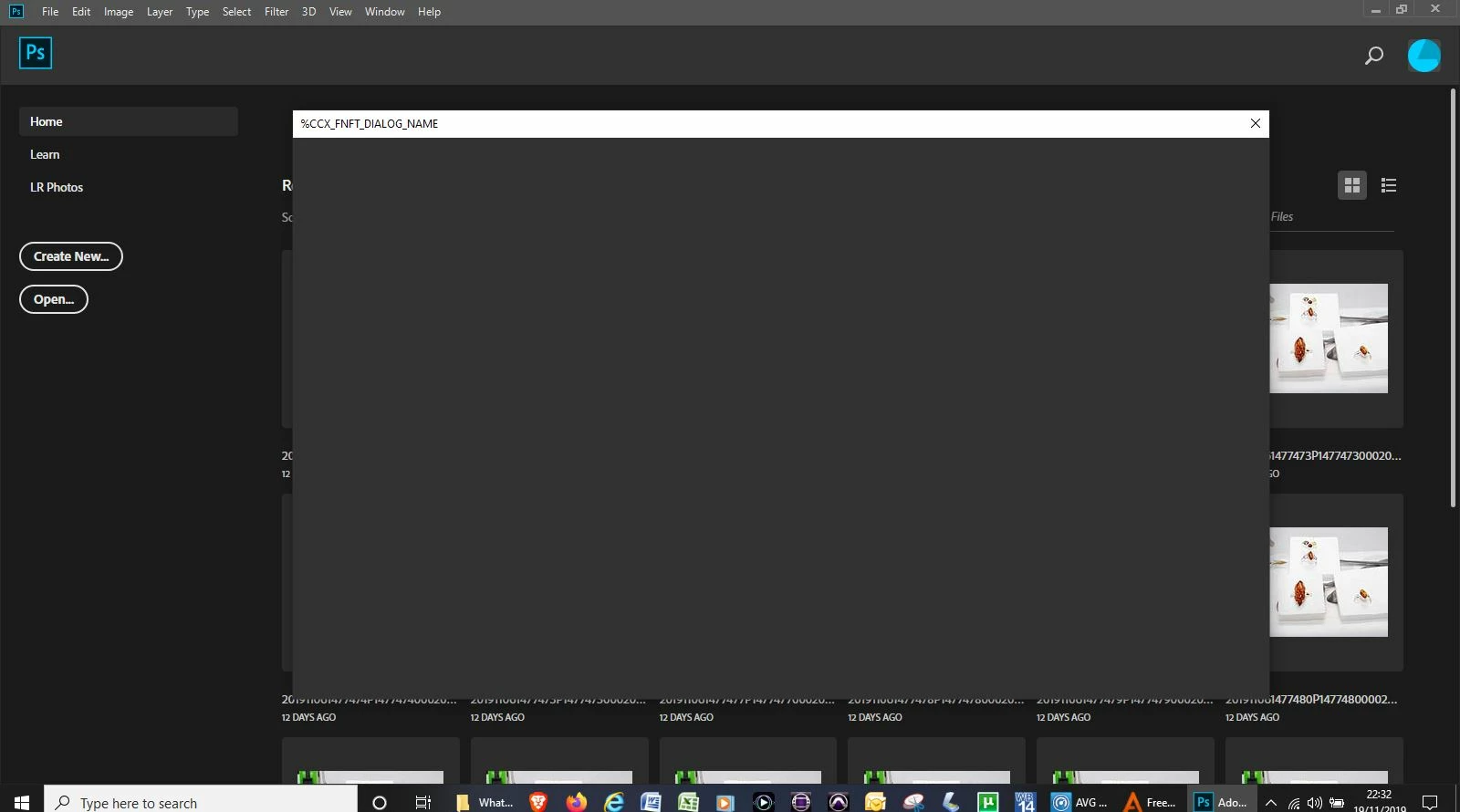
Create New dialogue box

  • November 19, 2019
  • 3 replies
  • 1773 views

Hi,

I am new to PS and just about to start the LinkedIn tutorials, but there is an immediate issue.  I open PS and it shows the recent images, then when clicking "Create New" I think there is an issue - see attached.

Please advise,

DC
This topic has been closed for replies.

3 replies

gener7
Community Expert
Community Expert
November 20, 2019

Be sure Legacy Compositing is checked on in Photoshop Preferences > Performance 


We'll have to wait for your System Info report to see if your video cards and drivers are where they should be.


Inspiring
November 20, 2019

Hi,

I've just updated to PS 2020, and all seems fine - see attached.

Fyi, here's my System Info.  Please let me know your thoughts.  Thank you, DC

OS Name Microsoft Windows 10 Home
Version 10.0.18362 Build 18362
Other OS Description Not Available
OS Manufacturer Microsoft Corporation
System Name DESKTOP-M1HAKH6
System Manufacturer ASUSTeK Computer Inc.
System Model N55SF
System Type x64-based PC
System SKU
Processor Intel(R) Core(TM) i7-2670QM CPU @ 2.20GHz, 2201 Mhz, 4 Core(s), 8 Logical Processor(s)
BIOS Version/Date American Megatrends Inc. N55SF.207, 29/08/2011
SMBIOS Version 2.6
Embedded Controller Version 255.255
BIOS Mode Legacy
BaseBoard Manufacturer ASUSTeK Computer Inc.
BaseBoard Product N55SF
BaseBoard Version 1.0
Platform Role Mobile
Secure Boot State Unsupported
PCR7 Configuration Binding Not Possible
Windows Directory C:\WINDOWS
System Directory C:\WINDOWS\system32
Boot Device \Device\HarddiskVolume1
Locale United Kingdom
Hardware Abstraction Layer Version = "10.0.18362.387"
Username DESKTOP-M1HAKH6\Daniel
Time Zone GMT Standard Time
Installed Physical Memory (RAM) 8.00 GB
Total Physical Memory 7.91 GB
Available Physical Memory 3.35 GB
Total Virtual Memory 14.4 GB
Available Virtual Memory 9.02 GB
Page File Space 6.49 GB
Page File C:\pagefile.sys
Kernel DMA Protection Off
Virtualisation-based security Not enabled
Device Encryption Support Reasons for failed automatic device encryption: TPM is not usable, PCR7 binding is not supported, Hardware Security Test Interface failed and the device is not Modern Standby, Un-allowed DMA-capable bus/device(s) detected, Disabled by policy, TPM is not usable
Hyper-V - VM Monitor Mode Extensions Yes
Hyper-V - Second Level Address Translation Extensions Yes
Hyper-V - Virtualisation Enabled in Firmware Yes
Hyper-V - Data Execution Protection Yes

John Waller
Community Expert
Community Expert
November 20, 2019

>>I've just updated to PS 2020, and all seems fine


That's good to know. 

SG...
Adobe Employee
Adobe Employee
November 19, 2019

Hi DC,


What Ps version are you using? And which Win version as well?
It would be best to go to Help>System Info... and copy the contents. Then paste them in a reply, or paste into a text doc and attach.


regards,

steve

SG...
Adobe Employee
Adobe Employee
November 20, 2019

Hi,


Before going back to Legacy New or disabling the extensions, can I suggest you install the newest major update of Photoshop.


Just make sure to uncheck the Remove old versions option.


JJMack
Community Expert
Community Expert
November 19, 2019

Screen capture are resized too small on this site. Is see the home workspace some empty window on top can nor make out what it is.  This site  need to address the usability of the site 

JJMack
John Waller
Community Expert
Community Expert
November 20, 2019

Extract from screenshot above


Lots of hits on this error message in Google.

https://community.adobe.com/t5/indesign/new-document-command-not-working/td-p/9678831


Most solutions are workarounds to use the legacy New Document interface.

Edit > Preferences > General, Use Legacy "New Document" Interface.


A better fix seems to be forcing Photoshop to recreate the extensions folder in C:\Program Files (x86)\Common Files\Adobe\CEP:

https://www.youtube.com/watch?v=Kuc2ffaCMOo (Solution 2 from 1:20 onwards)

SG...
Adobe Employee
Adobe Employee
November 20, 2019

Hi John,


The workaround in the video content doesn't force any recreation, it just loads a different and older extension. Those steps are also disabling other updated extensions from loading so it is too big of a hammer for this problem.


regards,

steve