Known Participant
February 13, 2025
Answered

Create new Exposure layer by script

  • February 13, 2025
  • 1 reply
  • 393 views

hi all,

I want to create an exposure adjustment layer and then set the value using a script. I searched on google but no results.

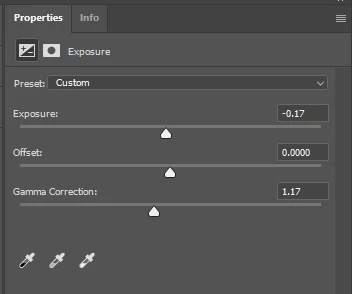
for example I want the script to create an exposure adjustment layer and set the following value:

expousure = -0.17

gamma = 1.17

please guide me the exact command.

I appreciate your help

Correct answer Stephen Marsh

@powerful_Zephyr5EF9 – Here you go:


ExposureAdjLayer(-0.17, 0, 1.17);

function ExposureAdjLayer(exposure, offset, gammaCorrection) {
	var s2t = function (s) {
		return app.stringIDToTypeID(s);
	};
	var descriptor = new ActionDescriptor();
	var descriptor2 = new ActionDescriptor();
	var descriptor3 = new ActionDescriptor();
	var reference = new ActionReference();
	reference.putClass( s2t( "adjustmentLayer" ));
	descriptor2.putReference( s2t( "null" ), reference );
	descriptor.putEnumerated( s2t( "presetKind" ), s2t( "presetKindType" ), s2t( "presetKindDefault" ));
	descriptor.putDouble( s2t( "exposure" ), exposure );
	descriptor.putDouble( s2t( "offset" ), offset );
	descriptor.putDouble( s2t( "gammaCorrection" ), gammaCorrection );
	descriptor3.putObject( s2t( "type" ), s2t( "exposure" ), descriptor );
	descriptor2.putObject( s2t( "using" ), s2t( "adjustmentLayer" ), descriptor3 );
	executeAction( s2t( "make" ), descriptor2, DialogModes.NO );
}

 

1 reply

Stephen Marsh
Community Expert
Stephen MarshCommunity ExpertCorrect answer
Community Expert
February 13, 2025

@powerful_Zephyr5EF9 – Here you go:


ExposureAdjLayer(-0.17, 0, 1.17);

function ExposureAdjLayer(exposure, offset, gammaCorrection) {
	var s2t = function (s) {
		return app.stringIDToTypeID(s);
	};
	var descriptor = new ActionDescriptor();
	var descriptor2 = new ActionDescriptor();
	var descriptor3 = new ActionDescriptor();
	var reference = new ActionReference();
	reference.putClass( s2t( "adjustmentLayer" ));
	descriptor2.putReference( s2t( "null" ), reference );
	descriptor.putEnumerated( s2t( "presetKind" ), s2t( "presetKindType" ), s2t( "presetKindDefault" ));
	descriptor.putDouble( s2t( "exposure" ), exposure );
	descriptor.putDouble( s2t( "offset" ), offset );
	descriptor.putDouble( s2t( "gammaCorrection" ), gammaCorrection );
	descriptor3.putObject( s2t( "type" ), s2t( "exposure" ), descriptor );
	descriptor2.putObject( s2t( "using" ), s2t( "adjustmentLayer" ), descriptor3 );
	executeAction( s2t( "make" ), descriptor2, DialogModes.NO );
}


Known Participant
February 13, 2025

@Stephen Marsh Thank you very much, it works fine.

Can I ask you one more thing?

I want to create an adjustment curve layer with the "Enhance Monochromatic Contrast " algorithm option.

Please guide me the exact command.

Stephen Marsh
Community Expert
Community Expert
February 13, 2025

I have a feeling that this will require more AM code knowledge and experience than I have.


My suggestion is that you create a new topic so that your question's visibility isn't lost when you mark my previous reply as a correct answer.