Participant
Mar 29, 2020 6:14 AM UTC
Answered

Creating a wavy border in PS

Hello all.


I am an absolute novice in PS but trying to slowly learn.


Can someone please tell me how to achieve the wavy bottom border as shown in the attached picture...??


Much appreciated.

barbara_a7746676
barbara_a7746676Correct answer
Community Expert
Mar 29, 2020 8:08 AM UTC

Rather than drawing the wave from scratch you could do this --

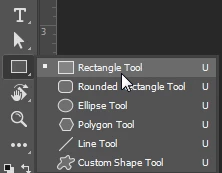
From the Shape tools, select the Rectangle tool.
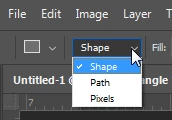
Make sure that Shape is selected in the Options bar.
Drag over an area to create a rectangle.

\

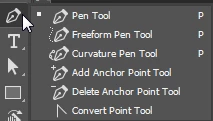
Select the Pen tool.

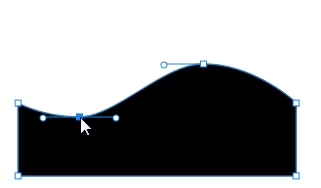
Click the top edge of the rectangle in two different place. That will add two anchor points.
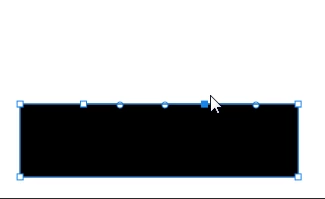
Select the Direct Selection tool.
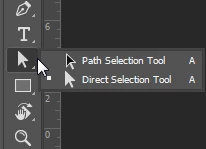
Press on a point and drag it into position.

 

8 replies

barbara_a7746676
Community Expert
barbara_a7746676Community ExpertCorrect answer
Community Expert
Mar 29, 2020 8:08 AM UTC

Rather than drawing the wave from scratch you could do this --

From the Shape tools, select the Rectangle tool.

Make sure that Shape is selected in the Options bar.

Drag over an area to create a rectangle.

\

Select the Pen tool.

Click the top edge of the rectangle in two different place. That will add two anchor points.

Select the Direct Selection tool.

Press on a point and drag it into position.

 

Translate
Participant
Mar 29, 2020 8:30 AM UTC

Holy cow!  You are a genius.


This looks like a simple and to-the-point solution.  Thank you.


So, since I am a noobie, how would I incorporate this within the picture...??  Would I place the rectangle on the bottom edge of the picture and use "transparent"...??  Sorry, but baby steps for me...:(


Thanks again.

Translate
barbara_a7746676
Community Expert
Community Expert
Mar 29, 2020 7:20 PM UTC

When Shape is selected in the Options bar (as in step 2), Photoshop will automatically create a new layer for you in the Layers panel. The shape will be on its own layer and the area around the shape will automatically be transparent. As long as that layer is above the layer that has the picture on it, the shape will appear above the picture. 

Give it a try. If you get stuck on one of the steps, just let me know.

Translate
barbara_a7746676
Community Expert
Community Expert
Mar 29, 2020 7:58 AM UTC

I would draw it as a shape layer using the Pen tool. If you've never used the Pen tool, it does take a little getting used to.

Translate