Joel xo
Inspiring
June 17, 2025
Answered

Creating or selecting a Channel Mixer adjustment layer moves focus to the Red value field

  • June 17, 2025
  • 2 replies
  • 175 views

About a hundred times a day I have to stop to wonder why my keyboard shortcut isn't doing anything, then glance up at the Properties panel and see the red Channel Mixer field highlighted and awaiting input, then I have to hit escape or enter to get back to work. Then it happens again a few seconds later.


This is brand new behavior in one of the last two updates, and it's a flow-killer. I'm generously assuming it's a bug, because if someone thought this was an improvement, that would be a terrible omen for future UI tweaks. 

Correct answer Jeff Arola

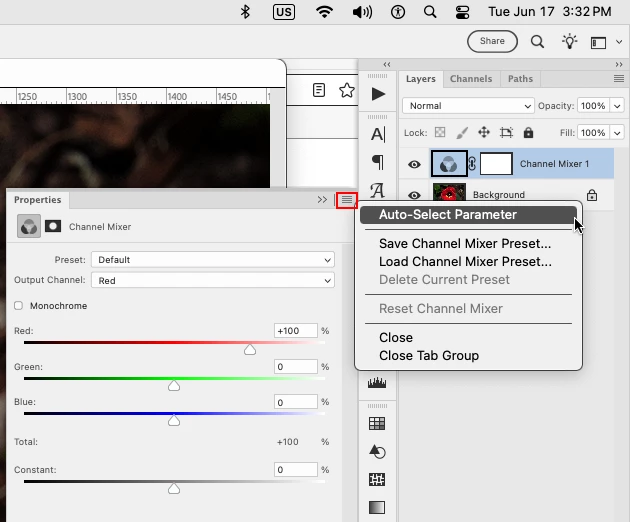
With the Channel Mixer Adjustment Layer selected, go to the Properties Panel flyout menu

and uncheck Auto-Select Parameter


2 replies

Joel xo
Joel xoAuthor
Inspiring
June 17, 2025

I remember looking there first, but not getting any relief. Funny thing, it took a few clicks to uncheck it, but I've quit and opened Photoshop a couple times since then and it hasn't respawned. User error either way. Just installed 26.8 and now I've got bigger problems (but involving third party integration so I think I'm on my own)

Jeff Arola
Community Expert
Jeff ArolaCommunity ExpertCorrect answer
Community Expert
June 17, 2025

With the Channel Mixer Adjustment Layer selected, go to the Properties Panel flyout menu

and uncheck Auto-Select Parameter