
aimeeb19880809
Participant
July 25, 2017
Answered

Creative Cloud Library Settings not allowing me to save layers

  • July 25, 2017
  • 3 replies
  • 707 views

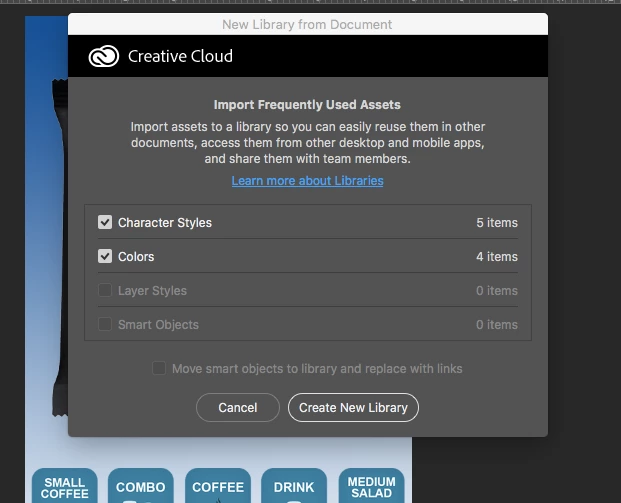
When I try to save my work to a Creative Cloud Library, I am not allowed to save the layers or smart objects... how can I adjust this setting.  I've tried the Photoshop preferences, Window, and View tabs, but I don't see a way to change these settings.  I've attached a screen shot to show what I'm talking about.

Thanks for your help!
    This topic has been closed for replies.
    Correct answer Barb Binder

    Thanks so much!


    You are very welcome!

    3 replies

    Barb Binder
    Community Expert
    Community Expert
    July 25, 2017

    Libraries know what you are trying to add to them. This text has a typeface, size and style (Font) and a Color. When I try to add it, those two are checked.

    If I add a Bevel (a layer style) and add it again, it checks that one too!

    If I convert the text object to a smart object (visible by the gray badge in my layers panel), and try to add it, it knows that as well.

    The library knows what properties are currently applied to what we are trying to add, even if we don't.

    ~Barb at Rocky Mountain Training
    davescm
    Community Expert
    Community Expert
    July 25, 2017

    Hi

    Can you show your layers panel

    Dave

    aimeeb19880809
    Participant
    July 25, 2017

    Hi Dave,

    Yes, I can see my layers panel....

    davescm
    Community Expert
    Community Expert
    July 25, 2017

    Hi

    I was asking to see the layers panel and the layers to see whether it contained smart objects and layers styles to save. The two layers you show in your screenshot are neither, but the scroll-bar suggest there are more.

    Dave

    Kanikas
    Legend
    July 25, 2017