Participant
Jun 10, 2017 10:23 PM UTC
Answered

Crop picture to custom shape

I am completely new to Photoshop and I'm not a techie, so I don't know what masks, layers, etc.. mean. I want to crop a picture into a heart shape. Here is the picture. I have created the custom heart shape I want. How do I crop the picture so that everything outside of the red heart is transparent, not just a white background? Please be specific of steps, because as I said I do not know most of the terms used in Photoshop. I'm trying to get this project done in time for Father's day. Thanks! I sincerely appreciate anyone's help.


    This topic is closed to new replies. Start a new post to keep the conversation going.
    davescm
    davescmCorrect answer
    Community Expert
    Jun 10, 2017 11:38 PM UTC

    Quick way

    Put your filled custom shape as the bottom layer

    Put your image above it

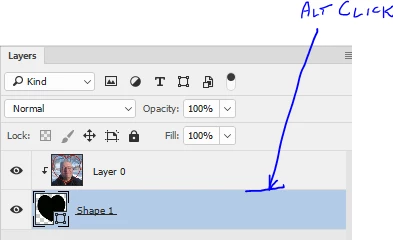
    In the layers panel Alt Click on the border between the two layers , so that a small sown arrow appears and the image is clipped to the shape

    You can use Save for Web to export as a PNG with transparency

    Dave

    6 replies

    JJMack
    Community Expert
    Community Expert
    Jun 10, 2017 10:41 PM UTC

    Crops are rectangular you can mask the outside area to transparent and save a png that will display as a heart shaped. the canvas is still a rectangle.

    Translate
    JJMack
    Yinner68Author
    Participant
    Jun 10, 2017 10:43 PM UTC

    OK. How do I mask the area outside the heart to transparent?

    Translate
    davescm
    Community Expert
    davescmCommunity ExpertCorrect answer
    Community Expert
    Jun 10, 2017 11:38 PM UTC

    Quick way

    Put your filled custom shape as the bottom layer

    Put your image above it

    In the layers panel Alt Click on the border between the two layers , so that a small sown arrow appears and the image is clipped to the shape

    You can use Save for Web to export as a PNG with transparency

    Dave

    Translate