
Pamela99
Known Participant
April 13, 2019
Answered

Crop tool - Delete Cropped Pixels checkbox missing in CC2019

  • April 13, 2019
  • 3 replies
  • 4729 views

The Delete Cropped Pixels checkbox is missing in this new April update. I used to have a checkbox which I could simply toggle on or off as needed. Now I don't know whether the icon that has replaced the checkbox is on or off. Is there anyway to bring back the checkbox? If not, how does one use this new icon?
    This topic has been closed for replies.
    Correct answer gener7

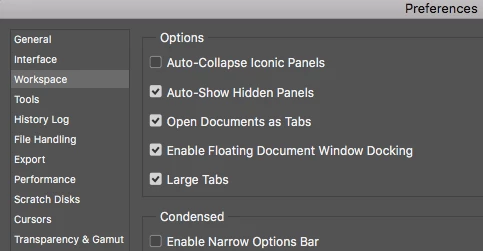
    You have "Enable Narrow Options Bar" checked. Uncheck it and restart Photoshop.

    3 replies

    Participant
    August 6, 2020

     I can't find any workspace options can u help me

    Pamela99
    Pamela99Author
    Known Participant
    April 13, 2019

    Thank you so much ... I thought I was saving space with that option. I didn't realize I would lose checkboxes.

    gener7
    Community Expert
    Community Expert
    April 13, 2019

    Actually the checkbox is replaced with  a button that does not tell you anything. That's the downside of the Narrow Options Bar, until you learn what the they mean.

    Pamela99
    Pamela99Author
    Known Participant
    April 13, 2019

    Yes, I could see what it was. I just couldn't figure out when it was on and when it was off.

    Anyway, thanks for your help.

    gener7
    Community Expert
    gener7Community ExpertCorrect answer
    Community Expert
    April 13, 2019

    You have "Enable Narrow Options Bar" checked. Uncheck it and restart Photoshop.