happy1940
Participant
September 4, 2025
Answered

Crop tool in Cloud-based Photoshot just started causeing image to disappear entirely.

  • September 4, 2025
  • 1 reply
  • 115 views

Suddenly my Cloud based Photoshop stopped responding correct when I use the crop tool.  The entire image disappears.   Control-Z will bring it back, but the problem persists.  The problem is not limited to one photo.  Re-booting my Windows 10 Pro computer did no good.  Can anyone help on this?  Yesterday everything was working properly.

Correct answer Jeff Arola

Are you using the desktop Photoshop version 2025?


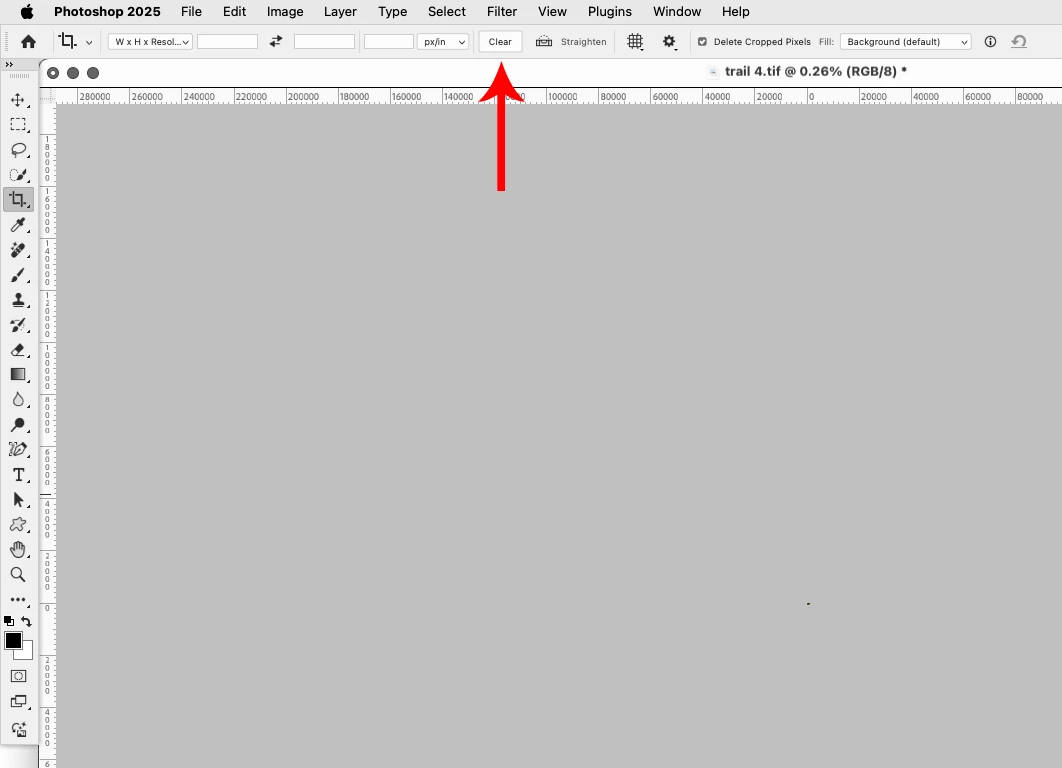
If so, when you have the Crop Tool selected up in the tool options bar, click on the Clear button to remove any values from the Width, Height and Resolution fields.


1 reply

Jeff Arola
Community Expert
Jeff ArolaCommunity ExpertCorrect answer
Community Expert
September 4, 2025

Are you using the desktop Photoshop version 2025?


If so, when you have the Crop Tool selected up in the tool options bar, click on the Clear button to remove any values from the Width, Height and Resolution fields.


happy1940
happy1940Author
Participant
September 12, 2025

I have no idea how this problem was created in the first place, but your solution worked.  I hope I do not have to remember if for the future.  I have used Photoshop since version 3 and never ran into this problem.