


Flowgun
Inspiring
June 27, 2025
Answered

Curves Adjustment layer bug with Show amount of "Light/Pigment"

  • June 27, 2025
  • 3 replies
  • 223 views

I just noticed this weird bug in the Curves Adjustment Layer. the Adjustment LAYER itself doesn't have an option to change the setting "Show Amount of:" to "Light" or to "Pigment/Ink", but the Curves Adjustment has that option. 
The bug is that when that option is changed in the Curves adjustment, it is retained for the Curves Adjustment Layer, with no option to change it in the actual Adjustment Layer, even after restarting photoshop.  
To change it back for Curves Adjustment Layer, you need to call the Curves Adjustment and change it from there, and maybe redo any Curves Adjustment layers that you already have.

Correct answer Stephen Marsh

@Flowgun 


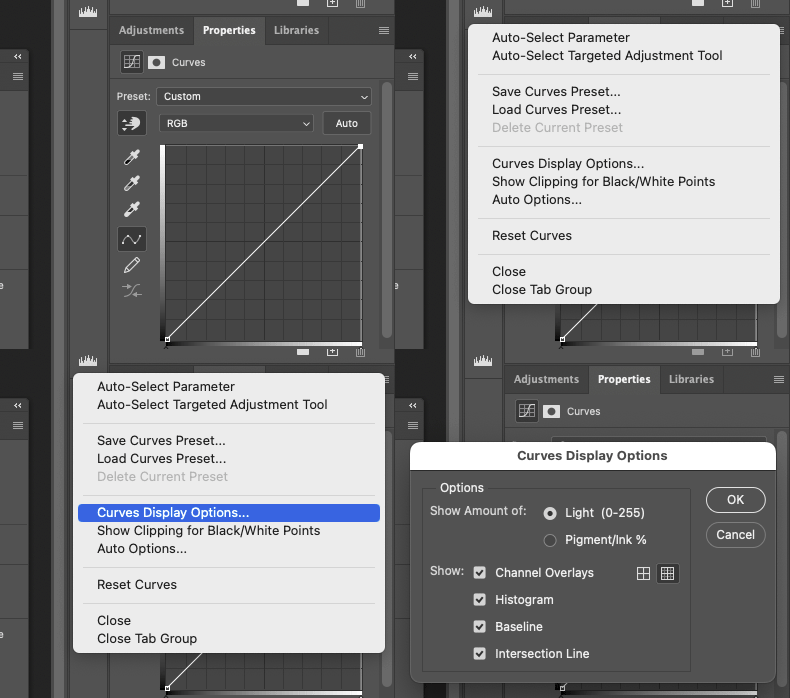
You're correct that the interface is different in the modal vs. non-modal interface, however it's still there in the options:


EDIT: Looks like @Jeff Arola beat me to it while I was creating that pretty animated GIF!  :]

3 replies

Stephen Marsh
Community Expert
Stephen MarshCommunity ExpertCorrect answer
Community Expert
June 27, 2025

@Flowgun 


You're correct that the interface is different in the modal vs. non-modal interface, however it's still there in the options:


EDIT: Looks like @Jeff Arola beat me to it while I was creating that pretty animated GIF!  :]

Flowgun
FlowgunAuthor
Inspiring
June 27, 2025

Ah Yes. thank you for that. but shouldn't the setting be independent from the Curves Adjustment? not sure about that though. maybe if someone wants to work with a different setting, then it's cool that a change there would result in a change everywhere.

Jeff Arola
Community Expert
Community Expert
June 27, 2025

With a Curves Adjustment Layer go to the Curves display flyout menu and under Display Options you can change the 

the setting "Show Amount of:" to "Light" or to "Pigment/Ink"