
Participant
November 7, 2024
Question

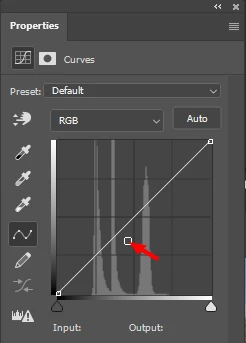
Curves adjustment tool shows a node off the editing line

  • November 7, 2024
  • 1 reply
  • 200 views

In Photoshop, quite often when I place a curves adjustment layer, the node in the attached image (red arrow) appears automatically in different locations below the editing line. I have scoured the Internet for help and can't find any explanation as to its function. Does anyone know what this is? Thank you in advance for your help.
This topic has been closed for replies.

1 reply

Bojan Živković11378569
Community Expert
Community Expert
November 7, 2024

When you create a Curves adjustment layer, that node should not appear where the red arrow is pointing, nor anywhere along the line initially; only nodes at the end of the line should be visible.


That's a bug or glitch on your side, possibly due to the GPU or something else. Have you tried resetting your preferences?

Participant
November 7, 2024

Thanks for your reply. Good to know it's just an "appendix" and not something that unlocks a new feature or may cause difficulty.

I'm not the only one experiencing this oddity. Others, with whom I've spoken, had experienced the same thing.

As for my GPU, it's a new Nvidia (Acer) 8Gb card upgraded from a Nvidia (Acer) 4Gb card. With both, I experienced the same thing.

Resetting my preferences does nothing.