Known Participant
September 18, 2025
Answered

Curves panel improvements

  • September 18, 2025
  • 6 replies
  • 501 views

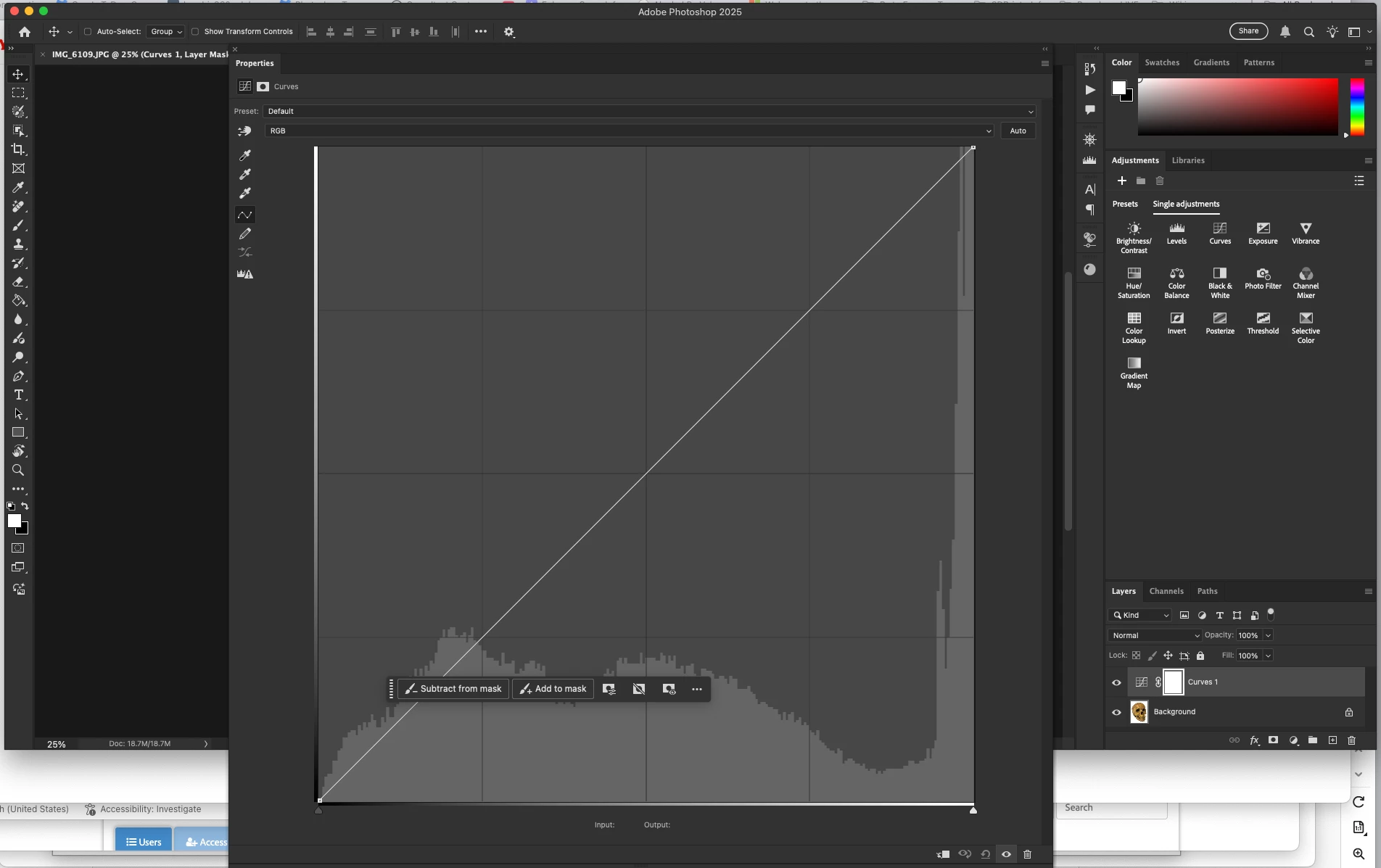
Please can we have the ability to make the curves adjustment panel much larger. It is very difficult to make tiny adjustments when it is so small.


Also being able to view the each of the channels layered over each other whilst making adjustments to only one channel at a time. The Davinci resolve curves panel is much nicer to use.  

Correct answer CShubert

Hi @Jack Gill if you pull out the Curves panel you can resize it to whatever screen size you would like.


Thanks,

Cory - Photoshop Product Manager

6 replies

Trevor.Dennis
Community Expert
Community Expert
September 21, 2025

Another thing to consider is to make sure the Properties panel is big enouigh to see the Input and Output fields, and use those for fine adjustments.  You can tab between them and use the cursor keys to adjust values.


I'm sure you know that if you enablwe the little hand icon (top left corner) you can Ctrl click on the image to place a pont on the curve that precisely matches that location's tonal value.

Jack GillAuthor
Known Participant
September 19, 2025

The resizing now work well, a great improvment. It would still be great to be able to see all of the channel when adjusting only one. 

amy durocher
Community Manager
Community Manager
September 19, 2025

Thanks Jack for the request, I will add it to our list of further Curves improvements.

Semaphoric
Community Expert
Community Expert
September 21, 2025

One thing I would like to see is CTRL+Tab cycling through control points, like you can with Image > Adjustments > Curves.

Jack GillAuthor
Known Participant
September 18, 2025

Amazing, i'll update straight away. Thank you for the replies. 

CShubert
Community Manager
CShubertCommunity ManagerCorrect answer
Community Manager
September 18, 2025

Hi @Jack Gill if you pull out the Curves panel you can resize it to whatever screen size you would like.


Thanks,

Cory - Photoshop Product Manager

robertw44482386
Inspiring
September 20, 2025

Noticing that when the panel is made much bigger, you can no longer use the cursor keys to nudge a selected point in any direction. Is this intended behavior? Resizing it to more typical size restores that functionality.

Jack GillAuthor
Known Participant
September 18, 2025

Can it now be any size? When I drag out the panel it stops at a certain size and won't go any larger. This has been the same in photoshop for years and years. 

amy durocher
Community Manager
Community Manager
September 18, 2025

This has been fixed in the 26.9 release of Photoshop Desktop.

rayek.elfin
Legend
September 21, 2025

OMG OMG OMG This actually FINALLY happened?!

I see pigs flying! There are pigs flying in the skies! Look! Look people! It must be the end times! The destroyer of worlds is upon us!

....


All kidding aside, I am happy to see my request --posted a mere 9 years and 4 months ago-- granted. So responsive and quick! Thank you!

https://community.adobe.com/t5/photoshop-ecosystem-ideas/p-curve-adjustment-graph-dialog-size-is-tiny-please-make-it-bigger/idi-p/12248760


It would have been even nicer if this outdated Curve editor dialog would have received a proper overhaul with additional features that have been available in other image editors for longer than we had to wait for a scalable curve editor, as has been pointed out by others here in this tghread. And it would have been SO great if the curve editor could have been non-proportionally scalable! Or have more readable info. 

And the resolution of the graph doesn't resolve to a higher resolution when working with 16 bit images (is Photoshop still 15bit +1 , btw?). But I suppose we shouldn't get too greedy. 


We have a scalable Curve adjustment dialog! Yay!


I immediately checked the Levels dialog, because OBVIOUSLY(!) that would be made to properly scale as well, right? Right? RIGHT?


NOOOOOOOOOOOOOOOOOOOOOOOOOOO!!!!!!!!!! (Sinking to the ground in sheer despair while raising fists to the heavens and uttering a deep guttural and agonizing cry)


Well, no biggie, I suppose. I am off writing another request. With a bit of luck we will have a scalable levels editor in.... Oh, around 2034. 

I can't wait! 😄 


So happy! Thank you SO much, Photoshop devs! So thankful. Very thankful. Thankful, indeed.