Nancy, the regular posters here will be bored with seeing me say this, but you are not the first person to experience this, and I count myself as a victim. So I keep all presets in a My Documents/Finder folder, and place shortcuts that redirect to those folders in the relevant Photoshop presets folder.
It means that:
- I keep those assets safe from updates that go wrong.
- I share the same assets between current release, beta, and any previous versions (I keep V22.2 for Lighting Effects)
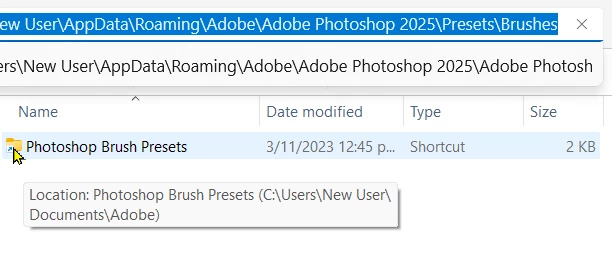
The downside is that if I create new presets, they are saved to the default location, so I have to remember to move them to my central cache — so to speak.
It's good practice to keep it in mind that assets live in the Photoshop settings file unless you export them. That means saving a group of brush presets to a .abr file, and the same with shapes, patterns, layer styles, gradients and any I have left out.. Custom Workspaces with their saved custom keyboard and toolbars just need the folder contents saved. It's just good Photoshop housekeeping, and saves frustration and heart ache





 AdChoices