In the latest version of PS, when I copy and paste layers or content, PS seems to paste the content out of it’s original position instead of perfectly matching where it was copied from.
Please fix this, it makes no sense to have it moved as default.
Like someone else said, for me Ctrl + V has always pasted right to the center of the canvas. (Though I indeed have found this quite annoying).
I’ve always had to use Place in Place (Ctrl + Shift + V) to get it to paste the same position, so I’m surprised it seems to have defaulted to that for you. Perhaps at one point you had changed the keyboard shortcut to make paste in place the Ctrl + V default.
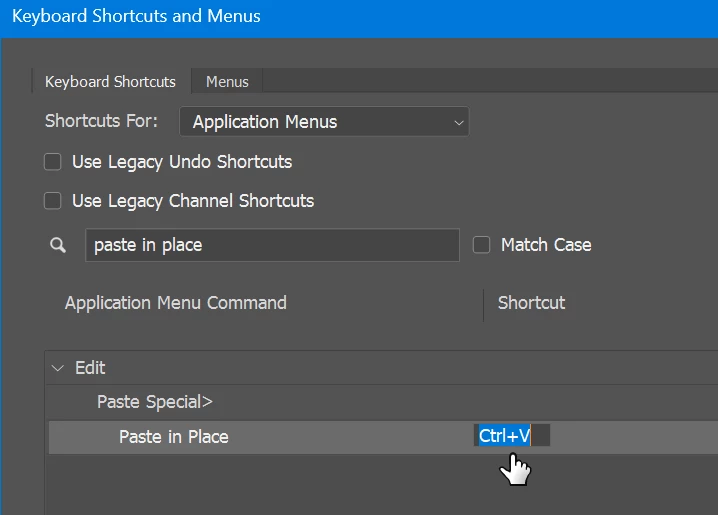
In any case you could simply set “Paste in Place” to Ctrl+V by going to
Edit > Keyboard Shorcuts
I will mention that for some reason, Photoshop tends to reset my keyboard shortcuts every few versions, not sure why. So if it randomly breaks again you might need to set it again. Perhaps that’s even what happened this time.
Like someone else said, for me Ctrl + V has always pasted right to the center of the canvas. (Though I indeed have found this quite annoying).
I’ve always had to use Place in Place (Ctrl + Shift + V) to get it to paste the same position, so I’m surprised it seems to have defaulted to that for you. Perhaps at one point you had changed the keyboard shortcut to make paste in place the Ctrl + V default.
In any case you could simply set “Paste in Place” to Ctrl+V by going to
Edit > Keyboard Shorcuts
I will mention that for some reason, Photoshop tends to reset my keyboard shortcuts every few versions, not sure why. So if it randomly breaks again you might need to set it again. Perhaps that’s even what happened this time.
Hi @PixelDeluxe - Could you screen shot you process for us to help us see the error?
If you are making a selection in Photoshop and have empty space selected while you copy and paste, the pasted content will center to the selection vs pasting in place.
Thanks for reporting this. Just to clarify the workflow, are you using the regular Ctrl/Cmd + V to paste, or Shift + Ctrl/Cmd + V (Paste in Place)?
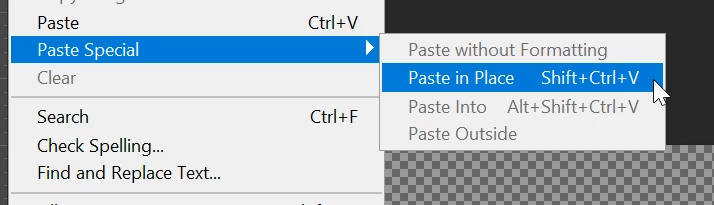
For comparison, could you please try Edit > Paste Special > Paste in Place and let us know whether the content is positioned correctly when using this menu command?
Paste in Place is specifically intended to preserve the position of the copied content. If the menu command works correctly but Shift + Ctrl/Cmd + V does not, we can investigate whether something is interfering with the keyboard shortcut. Occasionally, keyboard shortcuts can also be intercepted/ hijacked or remapped by third-party utilities.
Up until the most recent versions of PS it has pasted exactly in place using this, rather than out of position.
Why on earth is it the default for PS to paste things out of position? This is so backwards. I know Illustrator does it this way - but that is also SO annoying in there too (one of the many reasons why I moved over to Affinity for vector work!)
For what it’s worth, that has not been my experience: by default, Ctrl+V pastes the item dead centre in the image area. Paste in Place, or Layer Via Copy/Cut are the only ways to maintain position.





 AdChoices