
Participant
May 3, 2020
Question

Define Brush Preset Error

  • May 3, 2020
  • 1 reply
  • 751 views

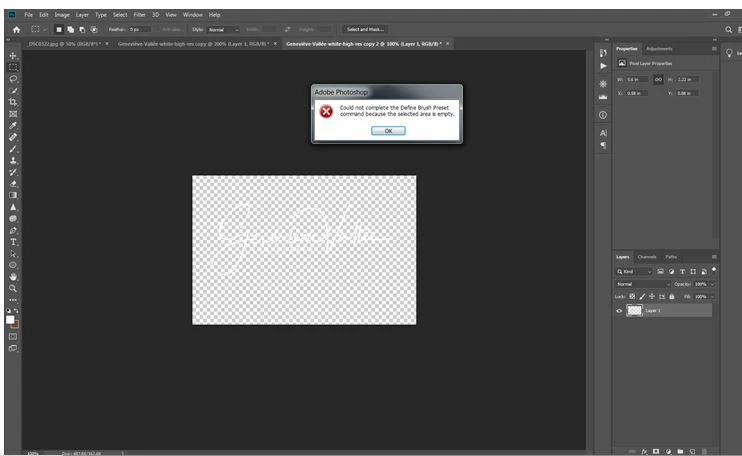
I am trying to Define Brush Preset a PNG file which is my white watermark on transparent background. I get the error message "Could not complete de Define Brush Preset, selected area is empty".


The file has only one layer.


What am I doing wrong? (it worked for another file which is black watermark on transparent background.


Any help appreciated. Thank you in advance.
    This topic has been closed for replies.

    1 reply

    Jeff Arola
    Community Expert
    Community Expert
    May 3, 2020

    Okay, in the world of photoshop brushes, specifically when making a custom brush (define a brush preset), Black 0,0,0 means 100% opaque (completely solid), while the further toward white one moves, the more transparent the brush gets until you reach White 255,255,255, which is fully transparent in the eyes of photoshop and defining a brush preset. So that's the reason for the cryptic error message since obviously a brush can not be fully transparent and one cannot select 100% transparent pixels.


    When making a brush to be saved as a preset you have to think in terms of the range

    Black 0, 0, 0 solid no transparency to White 255,255,255 fully transparent.


    So what that means if you want your brush to be a solid color, make your logo

    Black 0,0,0, define the brush preset, then you can use any color such as white to stamp your brush.


    Participant
    May 3, 2020

    Got you! Thank you so much.