macarenapizarro
Participant
April 1, 2025
Answered

Degrado con pincel

  • April 1, 2025
  • 1 reply
  • 188 views

Hola comunidad adobe, quiero saber como puedo hacer un degradado con un pincel específico en 5 tonos diferentes.

Correct answer Semaphoric

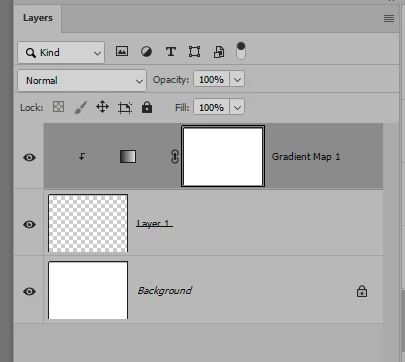
You can do this with Gradient Maps. Put a Gradient Map above an empty layer, and make a Clipping Mask of them:

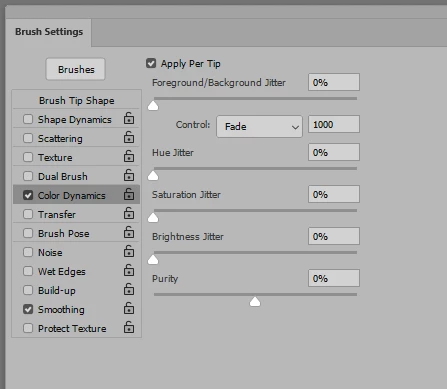
Set the foreground/background colors to the default black and white. In the Brush Settilng panel, make sure Color Dynamics ticked, and the Apply Per Tip box checked, with Control set to Fade.

It usually takes some trial and error to get the length of the Fade just right. I usually stroke a path when I do this so the brushstroke will be in the same place and same length.


1 reply

Semaphoric
Community Expert
SemaphoricCommunity ExpertCorrect answer
Community Expert
April 2, 2025

You can do this with Gradient Maps. Put a Gradient Map above an empty layer, and make a Clipping Mask of them:

Set the foreground/background colors to the default black and white. In the Brush Settilng panel, make sure Color Dynamics ticked, and the Apply Per Tip box checked, with Control set to Fade.

It usually takes some trial and error to get the length of the Fade just right. I usually stroke a path when I do this so the brushstroke will be in the same place and same length.