Participant
January 14, 2023
Answered

Disable Save to Cloud and Out of Cloud Storage

  • January 14, 2023
  • 7 replies
  • 5210 views

I am starting to get real frustrated with Adobe.  I don't want to ever save to the adobe cloud, there are much better cloud options.  I have set the default to save locally but it seems with the last upgrade it started saving to the cloud again. I once again set the default to save locally but I still get a notifier that I am out of cloud storage. 


I DON'T WANT CLOUD STORAGE

I DONT WANT NOTIFIERS REGARDING CLOUD STORAGE

I DO WANT EVERYTHING REGARDING ADOBE CLOUD TURNED OFF


How do I do this? This is really blatent upselling.  We pay a lot of money for your services the least you can do is respect our intelligence. 


This topic has been closed for replies.
Correct answer Stephen Marsh

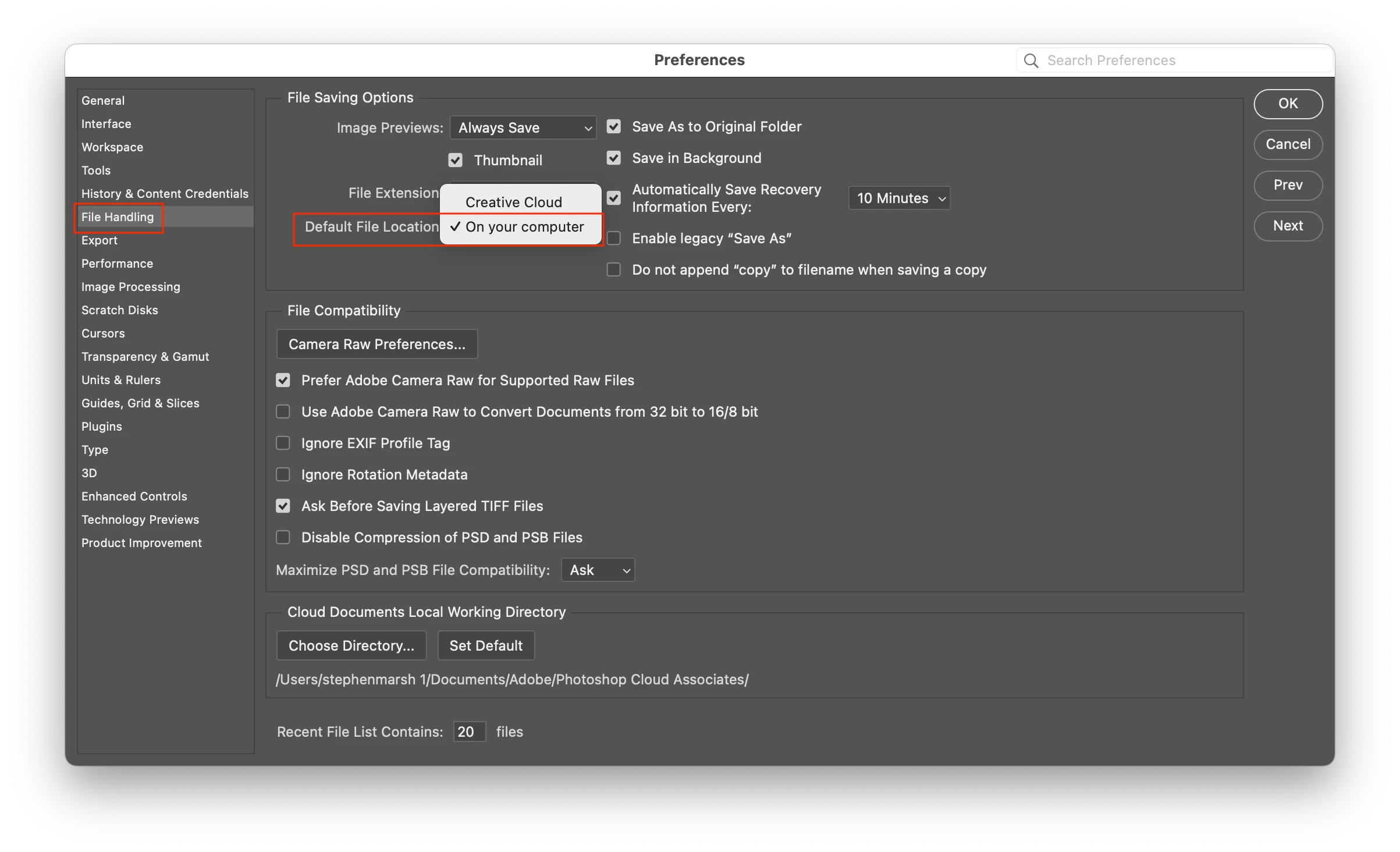
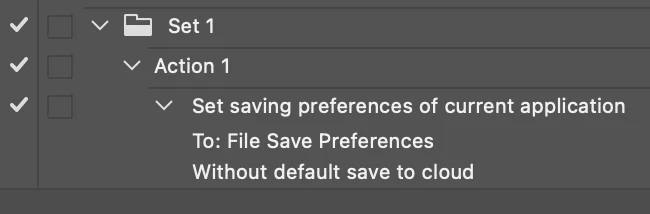
There are countless topics on the forum dealing with configuring local saves rather than the cloud, so I suggest you start by using the forum search feature. From your post, you already know how to do this. Preferences are often reset. So what you are after is a way to automatically have Photoshop's Preferences > File Handling set to use your local computer whenever Photoshop starts, which is possible via action or script via the Script Events Manager.


Preferences > File Handling:
Action:


JavaScript:


saveToCloud(false); // true to save to cloud

function saveToCloud(defaultCloudSave) {
	var s2t = function (s) {
		return app.stringIDToTypeID(s);
	};
	var descriptor = new ActionDescriptor();
	var descriptor2 = new ActionDescriptor();
	var reference = new ActionReference();
	reference.putProperty( s2t( "property" ), s2t( "fileSavePrefs" ));
	reference.putEnumerated( s2t( "application" ), s2t( "ordinal" ), s2t( "targetEnum" ));
	descriptor.putReference( s2t( "null" ), reference );
	descriptor2.putBoolean( s2t( "defaultCloudSave" ), defaultCloudSave );
	descriptor.putObject( s2t( "to" ), s2t( "fileSavePrefsClass" ), descriptor2 );
	executeAction( s2t( "set" ), descriptor, DialogModes.NO );
}


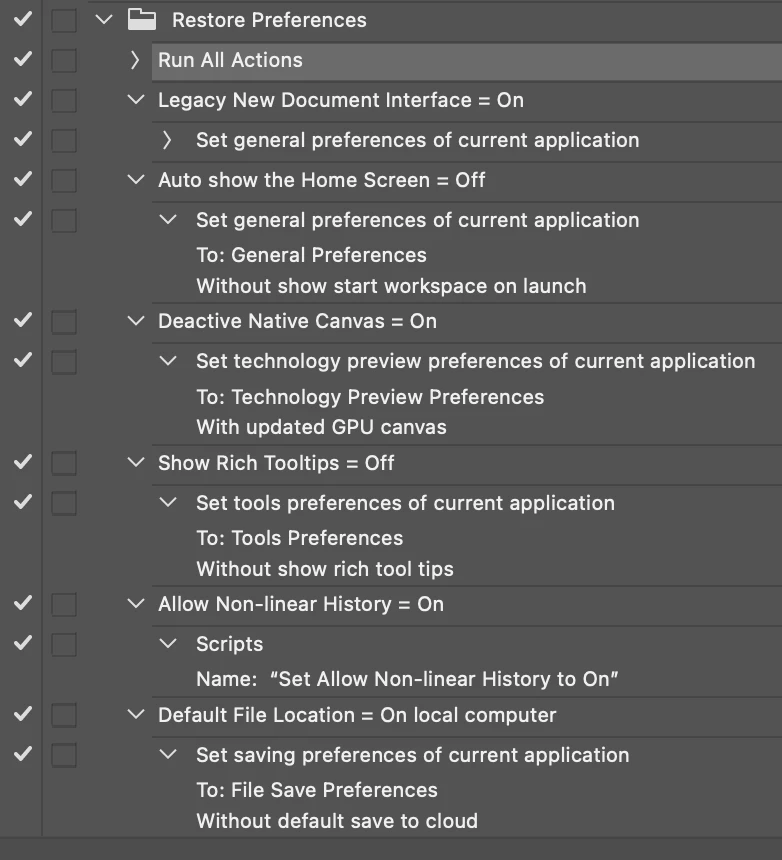
There are many preferences that one may wish to enforce, some that I personally reset via an Action and the Script Events Manager:


P.S. This isn't a bug, it is clearly a design decision you disagree with, so this topic would be better as an idea/feature request.

 

7 replies

Inspiring
January 29, 2026

I just tried this solution in 2026 using PhotoShop 2023. I hit a wall after I opened the file handling page. Under “cloud documents and local working directory” there is “choose directory” and “set default.” I feel the same way as the member who started this thread. How can I put a stop to automatic Adobe cloud storage?

Conrad_C
Community Expert
Community Expert
January 29, 2026

The “Cloud Documents and Local Working Directory” settings are not going to do what you want. Those settings apply only when you are actually using Cloud Documents. For example, those settings don’t really affect me because I don’t often use Cloud Documents. All those settings do is set the folder where the local cache of cloud documents is stored. They are not about cloud storage on/off.


The way to avoid “automatic Adobe cloud storage” is simply to not use Cloud Documents; in other words, in the Save As dialog box don’t click the “Save to Cloud Documents” button…leave it in its traditional local mode. The Save As dialog box should remember which way you set it last time (local or cloud). For example, because I typically need to save my files locally, I’m always using the Save As dialog box in local mode, and it always remembers, so I don’t accidentally save to the cloud because the Save As dialog box just stays set to local storage.

MarekMularczyk
Community Expert
Community Expert
January 20, 2023

I'm on 24.1.0 and I've got this option...


Adobe Community ExpertAdobe Certified Professional
j4m1eb
Known Participant
January 20, 2023

Photoshop 24.1.0, are Adobe are trolling us, are they hellbent on using cloud storage - Option to disable save to cloud has gone and I can't find it anywhere!!!


j4m1eb
Known Participant
January 20, 2023

Photohsop 24.1.0 and the option has vanished - annoying save to cloud box is back!!!


Stephen Marsh
Community Expert
Community Expert
January 20, 2023

Reset your preferences...

j4m1eb
Known Participant
January 20, 2023

Adobe just released Photoshop 24.1.1 with bugs fixes - guess what, the option is back

Stephen Marsh
Community Expert
Community Expert
January 15, 2023

@paulh91855373 – I’m focussed on solutions, so I don't have much else to add.

Participant
January 16, 2023

There is always a solution to every problem. I think the appropriate solution would be to petition Adobe to stop surruptitiosly resetting user settings just trying to upsell professionals that rely on their software but have abosultely no need for their cloud services.  Don't get me wrong it's not just Adobe, Apple and Google do the same.  Each cloud service from all the major providers have something to offer and each has their own pros and cons.  Once a user picks a cloud service there should no reason to pay for additional cloud services from other providers.  This is bad business and does and is not conducive to customer loyalty.  So please focus on the solution and advise.  

Stephen Marsh
Community Expert
Community Expert
January 16, 2023

@paulh91855373 – I am not an Adobe employee, I'm just an end-user, a forum volunteer. So I can only offer solutions based on my knowledge and experience with Actions and Scripting.


Preferences have always become corrupted or reset, long before cloud storage was introduced. I personally don't like rich tooltips or the home screen etc. So I use an Action and the Script Events Manager to automate resetting these preferences each time Photoshop is opened.


I don't agree with your statement that Adobe is intentionally resetting user preferences for nefarious purposes.


I do agree that the intentional decision to make cloud saves the default is not ideal for many users. For users that use an iPad and Photoshop on both platforms, this is obviously useful.


I'm pragmatic, which is why I have created and shared my solution to ensure that Photoshop preferences are always in the state that I wish.

Participant
January 15, 2023

This is most definitely either a bug or a high pressure to up-sell.  I would guess the latter. Every decent piece of software I have used that offers an inplace upgrade/update migrates ALL your settings over unless a particular service has so radically changed that it requires re-calibration or new changes in which case the user is notified during the upgrade process.  Which this is not the case. I have been involved in software developement for over 25 years. Who arbitrarily decides which settings are migrated and which ones are reset (this is a rhetorical question)? I find this inexcusable.

Stephen Marsh
Community Expert
Stephen MarshCommunity ExpertCorrect answer
Community Expert
January 15, 2023

There are countless topics on the forum dealing with configuring local saves rather than the cloud, so I suggest you start by using the forum search feature. From your post, you already know how to do this. Preferences are often reset. So what you are after is a way to automatically have Photoshop's Preferences > File Handling set to use your local computer whenever Photoshop starts, which is possible via action or script via the Script Events Manager.


Preferences > File Handling:

Action:


JavaScript:


saveToCloud(false); // true to save to cloud

function saveToCloud(defaultCloudSave) {
	var s2t = function (s) {
		return app.stringIDToTypeID(s);
	};
	var descriptor = new ActionDescriptor();
	var descriptor2 = new ActionDescriptor();
	var reference = new ActionReference();
	reference.putProperty( s2t( "property" ), s2t( "fileSavePrefs" ));
	reference.putEnumerated( s2t( "application" ), s2t( "ordinal" ), s2t( "targetEnum" ));
	descriptor.putReference( s2t( "null" ), reference );
	descriptor2.putBoolean( s2t( "defaultCloudSave" ), defaultCloudSave );
	descriptor.putObject( s2t( "to" ), s2t( "fileSavePrefsClass" ), descriptor2 );
	executeAction( s2t( "set" ), descriptor, DialogModes.NO );
}


There are many preferences that one may wish to enforce, some that I personally reset via an Action and the Script Events Manager:


P.S. This isn't a bug, it is clearly a design decision you disagree with, so this topic would be better as an idea/feature request.


Participant
January 20, 2023

Latest version 24.1.1 has this 'NOT a bug' or NOT a sleazy attempt to up-sell, corrected. Should I say that Adobe has changed their mind again about this 'design decision'?

Stephen Marsh
Community Expert
Community Expert
January 20, 2023
quote

Should I say that Adobe has changed their mind again about this 'design decision'?


By @paulh91855373


Not if cloud is still the default/fallback option, with computer being the "opt-in".