
Participant
October 21, 2022
Question

disable "save to creative cloud" gone in 2023

  • October 21, 2022
  • 8 replies
  • 10242 views

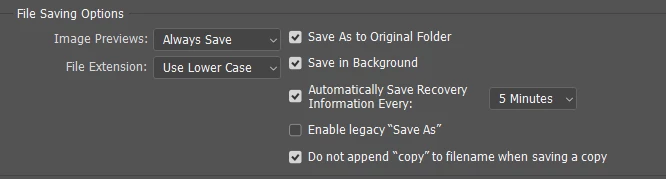
Hi there, I updated Photoshop to the newest version today (October 21 2022, v24.0) and this menu no longer exists. Need a way to turn this off! I turned all the options in this page on and off and the drop down never appears.


Then, dug through all the rest of the preferences to see if Adobe hid it somewhere else, seems as though you can no longer turn off the popup in any way. Have also checked user preferences in creative cloud itself, the option does not seem to exist. This is a huge waste of time to force everyone to opt into, hoping we get a solution soon.


8 replies

Participating Frequently
May 21, 2023

I MAY have found a possible solution, at least this worked for me, and I was able to get the 'default file save location' option back in file handling preferences (which was missing for me as well).

At the preference files location in windows

Users > [user name] > AppData > Roaming > Adobe > Adobe Photoshop [version] > Adobe Photoshop [version] Settings

i renamed (essentially removed) the dnsa.json file. (stands for do not show again).

upon doing so i launched PS, and the default file location option was available again in preferences!  Update the setting to my computer, and attempted to save and the cloud upsell dialog did not appear! 

I have not noticed any other issues with preferences at this time, all seems to be well. And becuase i simply renamed the original existing file, i can always revert to it. one interesting note is the fact that i did not see a new version of the dnsa.json file get recreated (which i was somewhat expecting). 


Participant
September 6, 2023

Path pointed me in the right direction, but the filename was "Adobe Photoshop 2023 Prefs.psp" (no longer a JSON file). After renaming and opening PS, the file handling option has returned. Thanks!

Participant
November 22, 2023

This worked for me as well in Photoshop CC 2024! Thank you! Now that option is back in settings... finally!

Participant
March 7, 2023

Got help from adobe with this. just change the default save location to your computer then close and restart PS. it should go away then

made.by.geoff
Known Participant
March 21, 2023

For Adobe: again for many people this option is nolonger showing up in the preferences. Why it shows up for some with seemingly the same setup is beyond me. But I can confirm that on Windows 10 and PS 24.2.1 (the current latest version) it does not show up in the preferences.


The only workaround I have been able to find is to uninstall and delete all preferences, re-install 23.4.1 which does have the option. As people say, then change the default save location to "your computer" and then reinstall and migrate preferences.


This has got to be the worst "feature" Adobe has ever introduced. Among the myriad other reasons it is a terrible idea: if you happen to work in a secure environment that doesn't allow access to the internet on your workstation. There is no way to save anything, becase the save as dialog box freezes on an empty screen...

PECourtejoie
Community Expert
Community Expert
October 28, 2022

Hello!

Can all affected users post the contents of help>system info...

Participating Frequently
October 28, 2022

Photoshop reports "24.0.0 Release" (in Help/About) and "Version 24.0" (in Creative Cloud).  My Windows Version is 10.0.19043 Build 19043.

PECourtejoie
Community Expert
Community Expert
October 28, 2022

No, not the first line, the entire contents.

Jeff Arola
Community Expert
Community Expert
October 22, 2022

I also encountered the same issue of missing Default File location in the File Handling Preferences.

Finally after a reinstall of photoshop the issue was resolved and it appeared.


Participating Frequently
October 27, 2022

What version of Photoshop are you using?

Jeff Arola
Community Expert
Community Expert
October 27, 2022

Photoshop 2023 (ps ver 24.0) running on Windows 10.


Did you try a reinstall using the Creative Cloud Desktop?

joeh87907460
Inspiring
October 22, 2022

It's still there in mine and I updated to the latest version, version 24 the other day. 

They do make it hard to find though.

Participating Frequently
October 27, 2022

The "Default File Location" dropdown disappeared when I updated to Photoshop v24.0.0.)

joeh87907460
Inspiring
October 28, 2022

That's strange, it didn't disappear when I updated to version 24.0.0. I'm using windows 10 with all the latest updates on that. I've had a lot of trouble with photoshop in the past and still have a few issues but nothing really major with this release, that I've discovered yet that is. I hope you can get it sorted out soon!

Semaphoric
Community Expert
Community Expert
October 21, 2022

It shows up fine for me:


Participating Frequently
October 27, 2022

Your screenshot must be from an older version.  As the the first post by caseylarae noted, the "Default File Location" dropdown is no longer present in the newest version.  (Disappeared when I updated to Photoshop v24.0.0.)

jane-e
Community Expert
Community Expert
October 21, 2022


@caseylarae wrote:

Hi there, I updated Photoshop to the newest version today (October 21 2022, v24.0) and this menu no longer exists.


The first thing to do is to confirm that you opened the same version you updated, as you may have more than one installed. Go to Help > About or open PS24.0 from the Creative Cloud app.


Jane


Participant
October 21, 2022

This solution no longer works as of October 2022, I guess. I need it turned off, this pop up is a massive waste of time; tried selecting and deselecting all the options on this page and "default file location" option never appears.


Adobe, please stop. I will never willingly pay for or use Creative Cloud save, and annoying pop-up ads within the program I'm already paying an arm and a leg for won't change that. Save function was better before.