
Participant
March 28, 2026
Question

Dither filter no longer avaliable?

  • March 28, 2026
  • 4 replies
  • 106 views

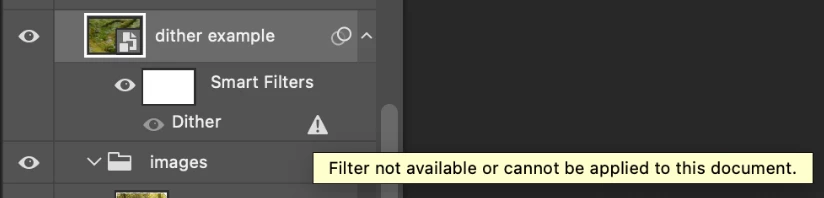
I have a file from 2022/23 where I created a template for images, and was using the dither filter. I’ve opened up this file now in my 2026 version of Photoshop, and when trying to apply this filter to a new image I’m met with an error icon and the text “Filter not avaliable or cannot be applied to this document”. 

The effect is still applied to the older image, but toggling the dither filter on and off will not reapply it. (I am also unable to edit the smart object to simply swap out the image)

I’m just wondering if the filter was removed, or if something is going wrong. If it was removed, what would be a suitible replacement? I’m just unable to find anything about this.
 

    4 replies

    g_7737458Author
    Participant
    March 30, 2026

    Hi all, I’m so sorry for the hassle but I believe I figured it out! I was grabbing the file to upload here, and was checking over the file info and it looks like I downloaded it from a web app that also uses .psd files. So I didn’t have an plug-in, but it also never existed in Photoshop. I’m just surprised that the filter showed up in Photoshop, despite it not existing there.

    Thank you so much for helping out though, I’m not sure I would’ve figured it out otherwise. 

    davescm
    Community Expert
    Community Expert
    March 29, 2026

    Whilst various functions in Photoshop have a dither option, I can’t recall a specific Dither filter being included.
    Could this have been an external filter you had installed, in which case it may just need to move it to the specific Adobe>Photoshop>2026 plug-ins folder, or the Common files>Adobe >Plug-Ins>CC folder. 

    Dave

    Semaphoric
    Community Expert
    Community Expert
    March 28, 2026

    Wat did the effect look like? There are many different styles of dithering.

    g_7737458Author
    Participant
    March 29, 2026

    Sorry, should’ve included that! Here’s a before and after (using the older image). I can’t see anywhere where it states exactly what type of dithering is applied, nor can I double click it to edit it like normal effects applied to smart objects.

    Before
    Dither applied


    c.pfaffenbichler
    Community Expert
    Community Expert
    March 29, 2026

    @g_7737458 , I can’t recall a default Filter called »Dither«.

    What was the last Photoshop version in which you used it? 

    It looks a little like Filter > Noise > Add Noise but possibly with some posterization. 


    Could you please provide the layered file? 

    jane-e
    Community Expert
    Community Expert
    March 28, 2026

    @g_7737458 


    Was this a plug-in? I just did a search and found several hits that could be the one you had, including this one:

    https://www.doronsupply.com/product/dithertone-pro


    Jane

    g_7737458Author
    Participant
    March 28, 2026

    I really don’t think so, I’ve never installed any plug-ins before (and frankly don’t really know how to). That being said, I am not finding any signs that this ever existed in Photoshop while searching online, so it’s possible?