dublove
Legend
November 8, 2025
Answered

Does the new Photoshop 2026 always automatically select the last tool used?

  • November 8, 2025
  • 2 replies
  • 154 views

When you press I and see the Eyedropper tool active, it immediately switches back to the last tool you used—often the Selection tools.

win 11  photoshop 2026

Correct answer jane-e

@dublove 


Like DFosse, I love spring-loaded shortcuts and have been using them ever since they were first introduced.


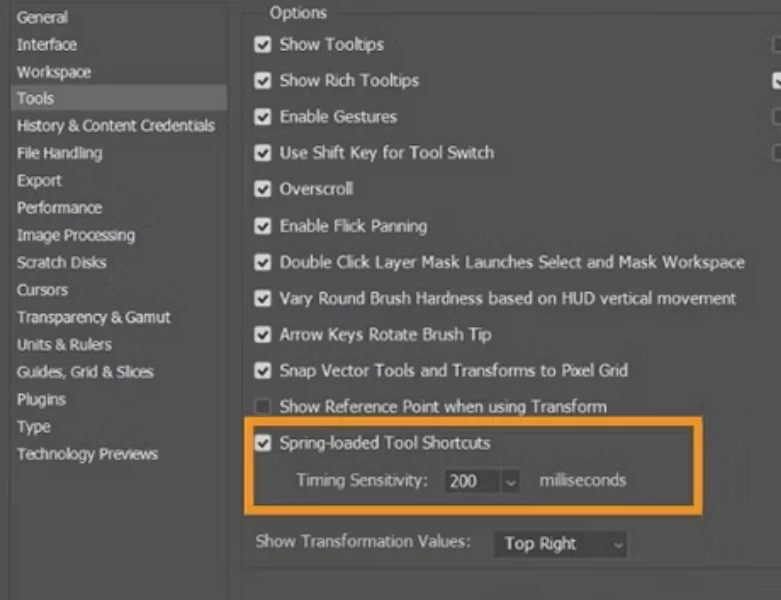
In addition to tapping instead of pressing, you can disable them in Preferences or change the timing sensitivity. Details here:

https://helpx.adobe.com/photoshop/desktop/get-started/set-up-toolbars-panels/spring-loaded-shortcuts.html


Jane

2 replies

jane-e
Community Expert
jane-eCommunity ExpertCorrect answer
Community Expert
November 8, 2025

@dublove 


Like DFosse, I love spring-loaded shortcuts and have been using them ever since they were first introduced.


In addition to tapping instead of pressing, you can disable them in Preferences or change the timing sensitivity. Details here:

https://helpx.adobe.com/photoshop/desktop/get-started/set-up-toolbars-panels/spring-loaded-shortcuts.html


Jane

D Fosse
Community Expert
Community Expert
November 8, 2025

This is not a bug, but a feature: It's called spring-loaded shortcuts.


If you quickly tap the key it stays on the tool. If you press and hold, it will return to the previous tool when the key is released. You adjust the timing in Preferences > Tools, or you can turn it off entirely.


Personally I find this immensely useful - you can grab a tool for a quick touchup and then return to whatever you were doing, without missing a beat.