


Does your latest Pshop have this issue with clipboard losing colour strength ?
Latest Photoshop.
open the attached file in working space Adobe RGB 1998 (the choice for many photographers and others working with accurate colours and a wide colour gamut recreating colours of nature and photoshoots)
hit printscreen button
Go file new and choose colour profile ‘working RGB AdobeRGB1998’. Color mode for me is always RGB colour and 8 bit. and that lot always works, or has done for decades. Monitor (color calibrated Eizo) is set to 80 candelas Adobe RGB 1998, Camera AdobeRGB1998, scanner ditto.
Paste and upload here the result.
If all is correct (as per CS6, and Pshop 2024) it will look like the source image.
If you have the Pshop 27 bug, it will have become something akin to sRGB, duller, earthy, lacking saturation etc.
now repeat and this time use Colour profile ‘Dont Color manage’ and what’s it like ?
here is the source file.
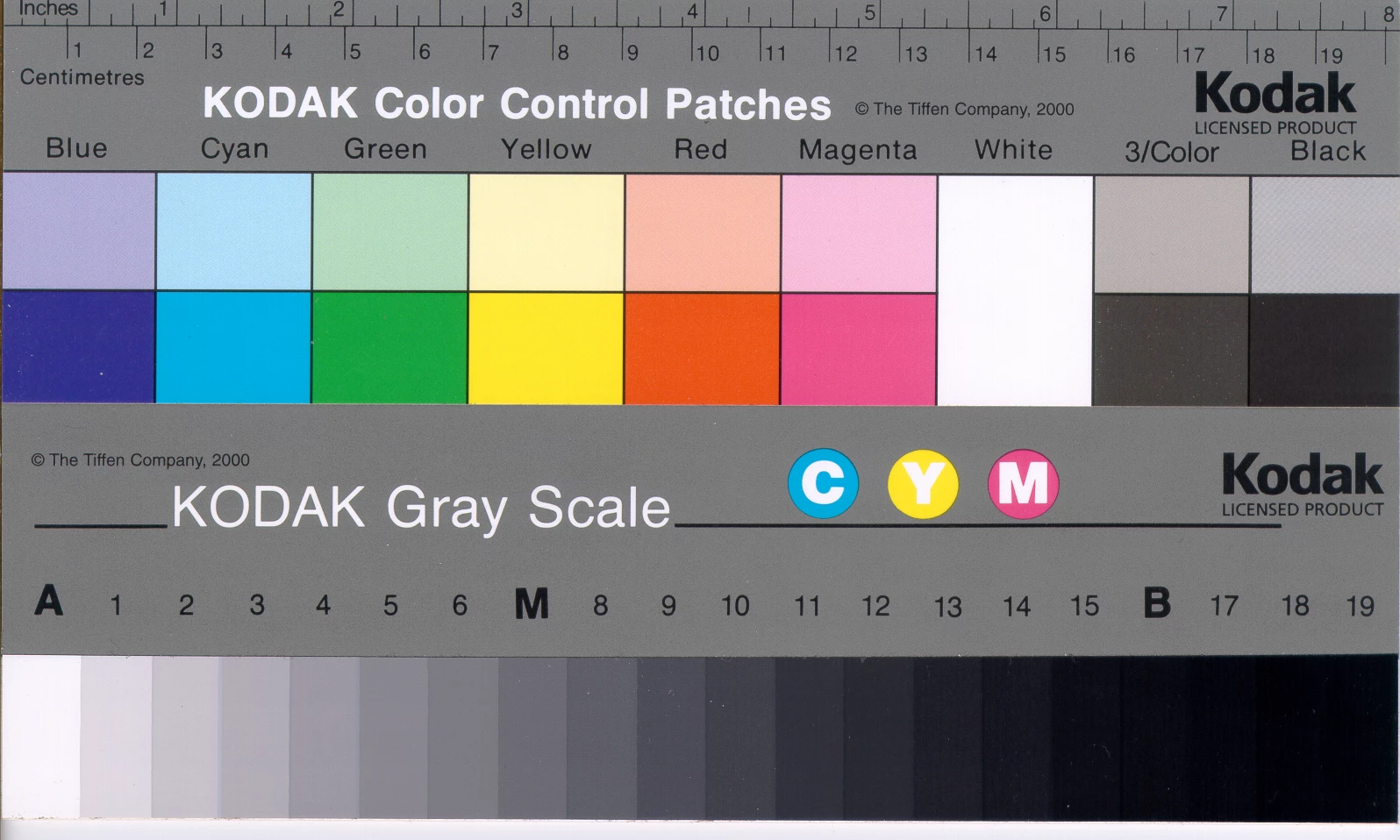
Adobe say they can’t replicate the problem so cannot fix it. A friend has it dull down for both Adobe RGB and also ‘Dont colour manage’, double trouble, whilst I have it dull down for just Adobe RGB. A techie did it and all was good.
I have been unable to use Pshop since January as copy paste is a big part of my workflow. Still awaiting a fix 7 months later.
So hence the survey, how is it for others ?
I will download your uploaded files and report back.
Merlin

 AdChoices