


Known Participant
March 11, 2025
Answered

Dont Hate Me!

  • March 11, 2025
  • 2 replies
  • 369 views

Hi all,
I am trying to use Chat GPT (dont hate me) to create a script which:

  • Creates a Curves Adjustment Layer
  • Names the layer “CURVES_Contrast_YYYY-MM-DD”

with the date being added automatically.

Here is the JSX code:


// Photoshop Script - Curves Adjustment Layer with Date-Based Naming (No Grouping)

if (app.documents.length > 0) {
    var doc = app.activeDocument;

    function getFormattedDate() {
        var date = new Date();
        return date.getFullYear() + "-" + ("0" + (date.getMonth() + 1)).slice(-2) + "-" + ("0" + date.getDate()).slice(-2);
    }

    var todayDate = getFormattedDate();

    // Create the Curves adjustment layer using an Action Descriptor
    var idMk = charIDToTypeID("Mk  ");
    var desc = new ActionDescriptor();
    var idAdjL = charIDToTypeID("AdjL");
    var ref = new ActionReference();
    ref.putClass(idAdjL);
    desc.putReference(charIDToTypeID("null"), ref);
    var idUsng = charIDToTypeID("Usng");
    var desc2 = new ActionDescriptor();
    var idType = stringIDToTypeID("curves");
    desc2.putClass(idType, idType);
    desc.putObject(idUsng, idAdjL, desc2);
    executeAction(idMk, desc, DialogModes.NO);

    var newLayer = doc.activeLayer;
    newLayer.name = "CURVES_Contrast_" + todayDate;

    alert("Curves Adjustment Layer created!");

} else {
    alert("No open document found.");
}


I get this error:
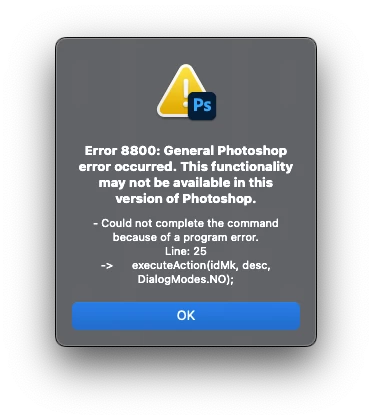
ChatGPT has tried multiple fixes and failed in the end. My intention is to create a script like this for each of the Adjustment Layers but so far I have failed at the first attempt.

Any suggestions for a non-coder?
Thanks
Sean

Correct answer Stephen Marsh

@seans9494305820435793 


Here is the ScriptingListener raw recording for a new Color Balance adjustment layer:


var idmake = stringIDToTypeID( "make" );
    var desc7 = new ActionDescriptor();
    var idnull = stringIDToTypeID( "null" );
        var ref1 = new ActionReference();
        var idadjustmentLayer = stringIDToTypeID( "adjustmentLayer" );
        ref1.putClass( idadjustmentLayer );
    desc7.putReference( idnull, ref1 );
    var idusing = stringIDToTypeID( "using" );
        var desc8 = new ActionDescriptor();
        var idtype = stringIDToTypeID( "type" );
            var desc9 = new ActionDescriptor();
            var idshadowLevels = stringIDToTypeID( "shadowLevels" );
                var list3 = new ActionList();
                list3.putInteger( 0 );
                list3.putInteger( 0 );
                list3.putInteger( 0 );
            desc9.putList( idshadowLevels, list3 );
            var idmidtoneLevels = stringIDToTypeID( "midtoneLevels" );
                var list4 = new ActionList();
                list4.putInteger( 0 );
                list4.putInteger( 0 );
                list4.putInteger( 0 );
            desc9.putList( idmidtoneLevels, list4 );
            var idhighlightLevels = stringIDToTypeID( "highlightLevels" );
                var list5 = new ActionList();
                list5.putInteger( 0 );
                list5.putInteger( 0 );
                list5.putInteger( 0 );
            desc9.putList( idhighlightLevels, list5 );
            var idpreserveLuminosity = stringIDToTypeID( "preserveLuminosity" );
            desc9.putBoolean( idpreserveLuminosity, true );
        var idcolorBalance = stringIDToTypeID( "colorBalance" );
        desc8.putObject( idtype, idcolorBalance, desc9 );
    var idadjustmentLayer = stringIDToTypeID( "adjustmentLayer" );
    desc7.putObject( idusing, idadjustmentLayer, desc8 );
executeAction( idmake, desc7, DialogModes.NO );

2 replies

josantgomez
Legend
March 12, 2025

Mi experiencia con Chatgpt abarca varios temas. En cuanto a PS, script, no tengo.  Pueden ocurrir cosas como que Chatgpt va con cierta demora con respecto a las novedades. Para que las tenga en cuenta es necesario tener activado con "razona" "buscar". Por otras partes un poco el "arte " está en las réplicas y contraréplicas, y no dejar de preguntar hasta que se obtenga la respuesta satisfactoria. Doy por seguro que todo eso lo has intentado, pero, si no es el caso, ahí queda mi experiencia. 

Stephen Marsh
Community Expert
Community Expert
March 11, 2025

@seans9494305820435793 


The block of code to create the curves adjustment layer is using Action Manager (AM) code. AM code can sometimes be specific to a certain Photoshop version, otherwise it's just a problem with the AI code.


If you wish to make this for each adjustment layer kind, you need to download and install Adobe's ScriptingListener plugin (if it works with your version), or do this with the built-in or third-party UXP developer tools, using AI will probably be hit and miss.


Here is your code updated and tested in v2021:


// Photoshop Script - Curves Adjustment Layer with Date-Based Naming (No Grouping)
try {
    if (app.documents.length > 0) {
        var doc = app.activeDocument;

        function getFormattedDate() {
            var date = new Date();
            return date.getFullYear() + "-" + ("0" + (date.getMonth() + 1)).slice(-2) + "-" + ("0" + date.getDate()).slice(-2);
        }

        var todayDate = getFormattedDate();

        // Create the Curves adjustment layer using an Action Descriptor
        var idmake = stringIDToTypeID("make");
        var desc179 = new ActionDescriptor();
        var idnull = stringIDToTypeID("null");
        var ref2 = new ActionReference();
        var idadjustmentLayer = stringIDToTypeID("adjustmentLayer");
        ref2.putClass(idadjustmentLayer);
        desc179.putReference(idnull, ref2);
        var idusing = stringIDToTypeID("using");
        var desc180 = new ActionDescriptor();
        var idtype = stringIDToTypeID("type");
        var desc181 = new ActionDescriptor();
        var idpresetKind = stringIDToTypeID("presetKind");
        var idpresetKindType = stringIDToTypeID("presetKindType");
        var idpresetKindDefault = stringIDToTypeID("presetKindDefault");
        desc181.putEnumerated(idpresetKind, idpresetKindType, idpresetKindDefault);
        var idcurves = stringIDToTypeID("curves");
        desc180.putObject(idtype, idcurves, desc181);
        var idadjustmentLayer = stringIDToTypeID("adjustmentLayer");
        desc179.putObject(idusing, idadjustmentLayer, desc180);
        executeAction(idmake, desc179, DialogModes.NO);

        var newLayer = doc.activeLayer;
        newLayer.name = "CURVES_Contrast_" + todayDate;

        alert("Curves Adjustment Layer created!");

    } else {
        alert("No open document found.");
    }
} catch (e) {
    alert("Error: " + e);
}


Known Participant
March 12, 2025

Stephen Marsh thank you so much for your help. I was able to get ChatGPT to successfully make all the other Adjustment Layers apart from Color Balance. I'm not sure it knows the correct stringIDToTypeID for Color Balance despite trying several:

"clrBlnc", "colorBalance", and "colorBalanceClass"


Stephen Marsh
Community Expert
Stephen MarshCommunity ExpertCorrect answer
Community Expert
March 12, 2025

@seans9494305820435793 


Here is the ScriptingListener raw recording for a new Color Balance adjustment layer:


var idmake = stringIDToTypeID( "make" );
    var desc7 = new ActionDescriptor();
    var idnull = stringIDToTypeID( "null" );
        var ref1 = new ActionReference();
        var idadjustmentLayer = stringIDToTypeID( "adjustmentLayer" );
        ref1.putClass( idadjustmentLayer );
    desc7.putReference( idnull, ref1 );
    var idusing = stringIDToTypeID( "using" );
        var desc8 = new ActionDescriptor();
        var idtype = stringIDToTypeID( "type" );
            var desc9 = new ActionDescriptor();
            var idshadowLevels = stringIDToTypeID( "shadowLevels" );
                var list3 = new ActionList();
                list3.putInteger( 0 );
                list3.putInteger( 0 );
                list3.putInteger( 0 );
            desc9.putList( idshadowLevels, list3 );
            var idmidtoneLevels = stringIDToTypeID( "midtoneLevels" );
                var list4 = new ActionList();
                list4.putInteger( 0 );
                list4.putInteger( 0 );
                list4.putInteger( 0 );
            desc9.putList( idmidtoneLevels, list4 );
            var idhighlightLevels = stringIDToTypeID( "highlightLevels" );
                var list5 = new ActionList();
                list5.putInteger( 0 );
                list5.putInteger( 0 );
                list5.putInteger( 0 );
            desc9.putList( idhighlightLevels, list5 );
            var idpreserveLuminosity = stringIDToTypeID( "preserveLuminosity" );
            desc9.putBoolean( idpreserveLuminosity, true );
        var idcolorBalance = stringIDToTypeID( "colorBalance" );
        desc8.putObject( idtype, idcolorBalance, desc9 );
    var idadjustmentLayer = stringIDToTypeID( "adjustmentLayer" );
    desc7.putObject( idusing, idadjustmentLayer, desc8 );
executeAction( idmake, desc7, DialogModes.NO );