

Jeff Van Syckle
Participating Frequently
December 9, 2024
Answered

Download from "Your Files" from Creative Cloud

  • December 9, 2024
  • 3 replies
  • 921 views

I'm going to try once more toget a straight-forward answer to this question:


I'm running out of storage space on Creative Cloud. I cannot afford the fee charged to expand my storage. How can I download my files to my computer so I can delete them from Craetive Cloud and free up space? Can I really only download one file at a time? And lastly, I've been paying for my subscription for many years; don't my files belong to me?


Thanks for any help or information anyone can provide!
Correct answer Stephen Marsh

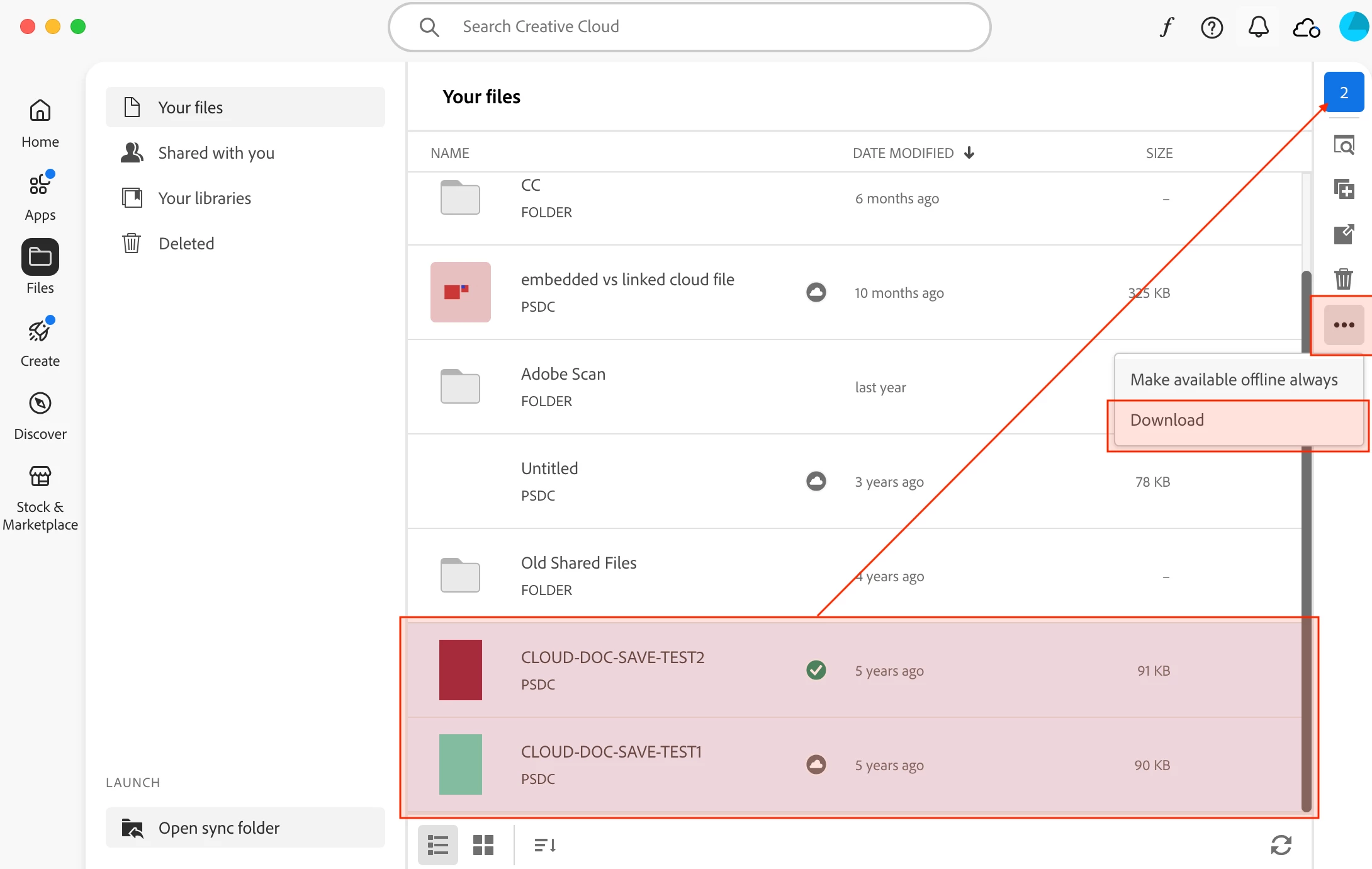
@Jeff Van Syckle – In the Creative Cloud app, select multiple files (Ctrl/Cmd or Shift clicking) as shown below and select download:


Double-check that the downloaded files open in Photoshop correctly before deleting from the cloud.


3 replies

social_Enchantment5CB5
Participating Frequently
February 7, 2025

They are going to make this impossible for you.  They've removed the option to map a local drive to Creative Cloud, they've elimianted Creative Cloud Sync, and they've now limited the desktop app to downloading ten files at a time.  I've got 50,000 files in my cloud instance, so I only need to select ten files at a time five thousand times to get away from them.

Stephen Marsh
Community Expert
Community Expert
December 10, 2024
quote

... don't my files belong to me?


By @Jeff Van Syckle


Who said that they didn't?

Stephen Marsh
Community Expert
Stephen MarshCommunity ExpertCorrect answer
Community Expert
December 10, 2024

@Jeff Van Syckle – In the Creative Cloud app, select multiple files (Ctrl/Cmd or Shift clicking) as shown below and select download:


Double-check that the downloaded files open in Photoshop correctly before deleting from the cloud.


Jeff Van Syckle
Participating Frequently
December 10, 2024

Thank you VERY much!! I have searched for help on this and asked this question multiple times nd never seemed to get a straight answer. I seemed to keep getting back to the idea of what's saved and no longer saved on my computer in the Creative Cloud folder and when that stopped being used. 
So, I thank you again. I'll try this out. 
P.S. No one said my files didn't belong to me, I was just having a hard time figuring out how to get them all on my MacBook. 

Stephen Marsh
Community Expert
Community Expert
December 10, 2024

@Jeff Van Syckle – You're welcome. So how did you get on with your multiple selected file download?