MahaB82A
November 7, 2024
Question

Drag & Drop Problem

  • November 7, 2024
  • 1 reply
  • 630 views

Normally if I want to place an icon in Ps I drag & drop that icon in Ps app that shows in the task bar in Windows. But it does not work any more & shows a stop sign. How to fix it?
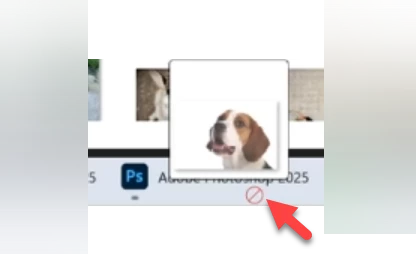

 

This topic has been closed for replies.

1 reply

Sameer K
Community Manager
Community Manager
November 7, 2024

Hey, @MahaB82A. Welcome to the Photoshop community. I'll need more specific info about this, and I'll help you figure it out. Please share the system info from Photoshop Help > System info > Copy and paste into a text document > upload and attach here.


Does this happen after a specific series of steps?


Try this: set Photoshop to run with administrator privileges by default.

  • Go to C:\Program Files\Adobe\Photoshop 2024
  • Right-click on Photoshop.exe > Properties > Compatibility > Change Settings for all users > Check 'Run this program as an administrator'

SameerK_0-1661346557691.png

  • Click on OK & Apply to save the changes.

Let me know how it goes. Thanks!

Sameer K

(Use '@mention' to tag me when you reply)

MahaB82A
MahaB82AAuthor
November 7, 2024

System Information is attached.


Your screenshot is not clear enough.


Sameer K
Community Manager
Community Manager
November 7, 2024

Thanks for sharing the info. I'll attach a GIF to help you with this. 


Thanks!

Sameer K