


Dual monitor bugged in Sonoma
I've did a test upgrade with Sonoma (14.1) and I have issues (tested with PS 2024 and 2023) while setting up windows in 2nd monitor:
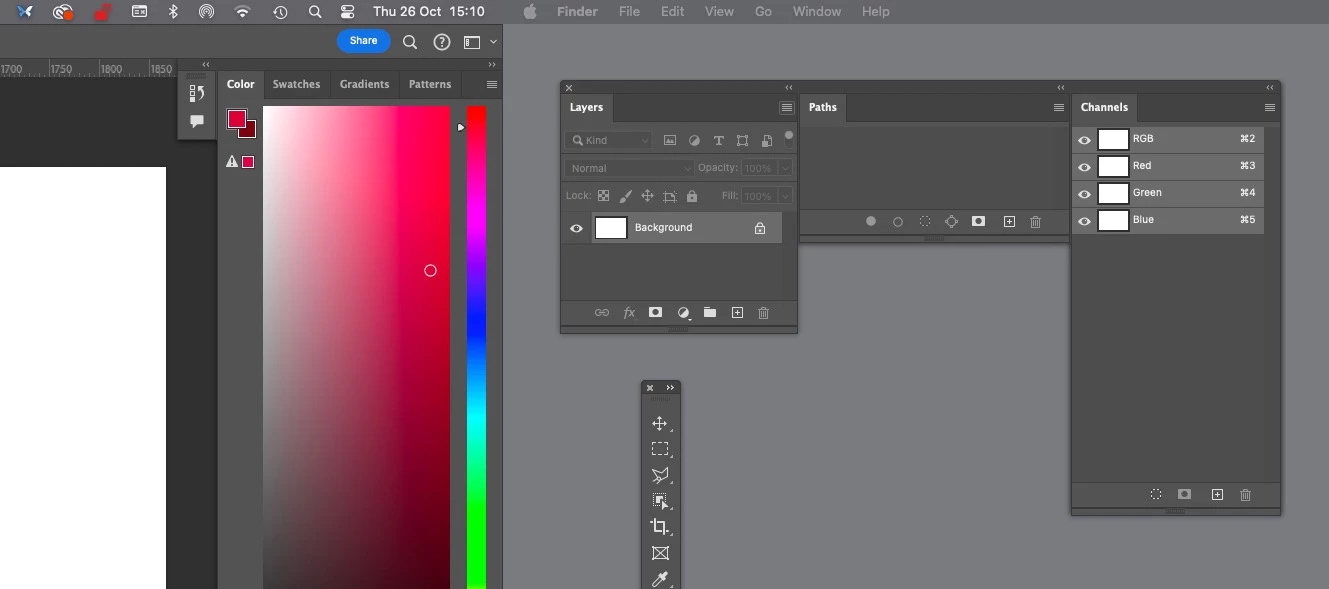
I can drag panels to 2nd monitor but as soon as I dock them to each other they stop responding and cant use (or move) them because any click on them exits PS and reverts to Finder. I did have a few saved workspaces that work but most didnt, unfortunately cant screen record both monitors at same time, but here is what it looks on my extended monitor with photoshop panels (using ALT-TAB to switch back to PS after it auto-exits):
https://www.youtube.com/watch?v=ps2kPwc0t_Y
I've tried disable and enable "displays have separate spaces" with no distinguishable results, also changed "click wallpaper to reveal desktop" to "only in stage manager" , and also didnt work.
EDIT: BTW in 2023 cant even move toolbar without first enabling "aplication frame":
https://www.youtube.com/watch?v=s5565wfqVwM
 AdChoices