michaljanata
Inspiring
January 15, 2024
Answered

Duplicated gradient not editable

  • January 15, 2024
  • 1 reply
  • 380 views

When I create adjustment layer with gradient mask and duplicate this layer, gradient in duplicated layer is not editable with gradient tool anymore.

Same when copying mask with gradient to another layer.


PS 25.3.1

This topic has been closed for replies.
Correct answer Sameer K

Hey, @michaljanata. I'll help you figure this out. Please share a sample PSD & the system info from Photoshop Help > System info > Copy & paste into a text document > upload & attach here. 


I'll move this to discussions for now. I could not recreate this with the limited description. Please describe in details or share a video record of your workflow.


In general, resetting Photoshop can help. Try the given steps:

Go to the location of the preference folder below, and rename it to backup. https://adobe.ly/3Sk2B8n


  • Windows 10/11: Users/[user name]/AppData/Roaming/Adobe/Adobe Photoshop (Beta) [version]
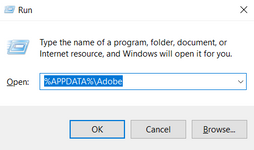
  • Press Windows + R & type this is the Run Window - %APPDATA%\Adobe
    SameerK_0-1686689907552.png


  • Rename the Adobe Photoshop folder by adding a .old at the end. (Adobe Photoshop 2024 > Rename > Adobe Photoshop 2024. old)


These changes will give a fresh start to Photoshop (beta) as a fresh install. Let me know if the issue exists.

Thanks!

Sameer K

1 reply

Sameer K
Community Manager
Sameer KCommunity ManagerCorrect answer
Community Manager
January 15, 2024

Hey, @michaljanata. I'll help you figure this out. Please share a sample PSD & the system info from Photoshop Help > System info > Copy & paste into a text document > upload & attach here. 


I'll move this to discussions for now. I could not recreate this with the limited description. Please describe in details or share a video record of your workflow.


In general, resetting Photoshop can help. Try the given steps:

Go to the location of the preference folder below, and rename it to backup. https://adobe.ly/3Sk2B8n


  • Windows 10/11: Users/[user name]/AppData/Roaming/Adobe/Adobe Photoshop (Beta) [version]
  • Press Windows + R & type this is the Run Window - %APPDATA%\Adobe

    SameerK_0-1686689907552.png


  • Rename the Adobe Photoshop folder by adding a .old at the end. (Adobe Photoshop 2024 > Rename > Adobe Photoshop 2024. old)


These changes will give a fresh start to Photoshop (beta) as a fresh install. Let me know if the issue exists.

Thanks!

Sameer K
