
Vikas Shah
Participant
June 1, 2026
Question

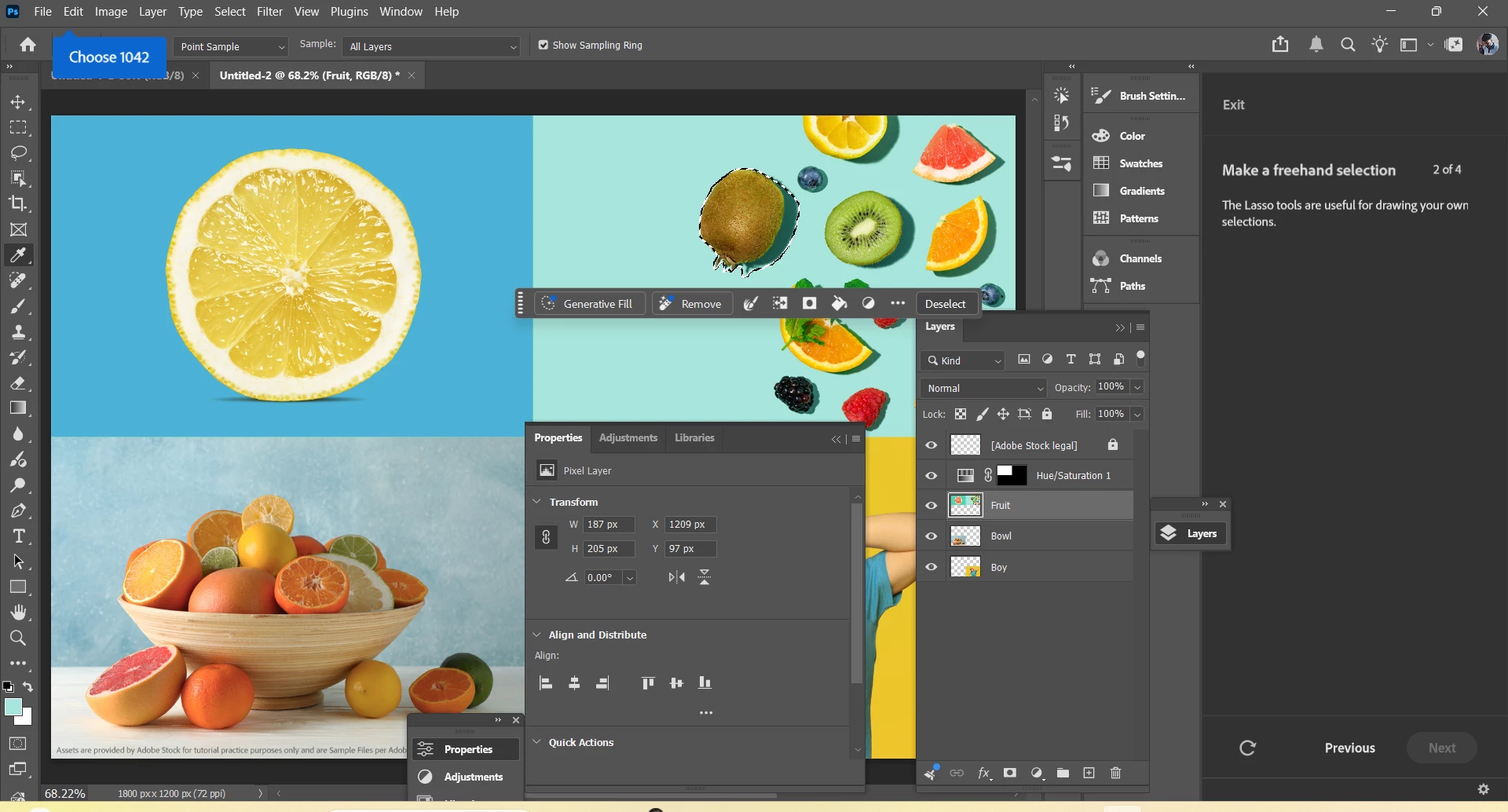
during tutorial apps shows select 2201 and similarly other numbers during tutorial
  • June 1, 2026
  • 1 reply
  • 25 views
getting this type of codes during tutorials such as select 2201 and now chose 1042


    1 reply

    nik.m
    Community Manager
    Community Manager
    June 2, 2026

    Hi, thanks for reaching out and sharing this!

    I tried a couple of tutorials on my end, but I'm not seeing this behavior. Could you share which version of Photoshop you're using and which version of Windows you're working on?

    It would be helpful if you could share a short video as well, so we can follow along and see if we can replicate it.


    Thanks,

    Nikunj

    Vikas Shah
    Participant
    June 2, 2026

    error will show up at 02:17 , I have recorded my screen with all details

    Sameer K
    Community Manager
    Community Manager
    June 10, 2026

    Hey, ​@Vikas Shah. Sorry for the delay in getting to your post. I'll help you figure this out. Please share the system information from Photoshop Help > System Info > Copy and paste into a text document > Upload and attach here. 


    Have you recently also updated Windows or any other drivers? go to the location of the preference folder below and rename it to backup.

    • Windows 10/11: Users/[user name]/AppData/Roaming/Adobe/Adobe Photoshop [version]/Adobe Photoshop [version] Settings

    • You can press Press the Windows key > Enter 'Run' > Enter %APPDATA%\Adobe

    • Rename the Adobe Photoshop folder by adding a .old at the end. (Adobe Photoshop 2026 > Rename > Adobe Photoshop 2026. old), You can restore these preferences later if you need to.(https://adobe.ly/4860qM9)

    • Restart the computer.


    These changes will give Photoshop a fresh start as a new install. Let me know how it goes.

    Thanks!

    Sameer K

    (Type '@' and type my name to mention me when you reply)
