
January 26, 2020
Answered

Embed linked image by javascript

  • January 26, 2020
  • 2 replies
  • 1040 views

Hey guys im getting an error for using the action script listener for embed linked image.


Here's the error:
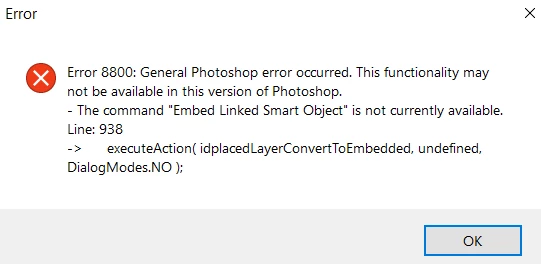
 

and here's the code I used:


EmbedImg();
function EmbedImg()
{
    var idplacedLayerConvertToEmbedded = stringIDToTypeID"placedLayerConvertToEmbedded" );
    executeActionidplacedLayerConvertToEmbeddedundefinedDialogModes.NO );
}
 
I tried to catch and ignore the error, but it only works on the first linked image. I have the latest version of photoshop.
 
try 
{
      EmbedImg();
catch (ignored) {}
                        
This topic has been closed for replies.
Correct answer jazz-y

Before calling this function, you must make active or select (one or more) layers.

If you need to convert all layers of a document, then instead of selecting them in a loop, easier to do this:


var idplacedLayerEmbedAll = stringIDToTypeID( "placedLayerEmbedAll" );
executeAction( idplacedLayerEmbedAll, undefined, DialogModes.NO );


2 replies

Stephen Marsh
Community Expert
Community Expert
January 26, 2020

My suggestion is very close to the one supplied by Dmitry:


app.runMenuItem(stringIDToTypeID('placedLayerConvertToEmbedded'));


or


app.runMenuItem(stringIDToTypeID('placedLayerEmbedAll'));
jazz-yCorrect answer
Legend
January 26, 2020

Before calling this function, you must make active or select (one or more) layers.

If you need to convert all layers of a document, then instead of selecting them in a loop, easier to do this:


var idplacedLayerEmbedAll = stringIDToTypeID( "placedLayerEmbedAll" );
executeAction( idplacedLayerEmbedAll, undefined, DialogModes.NO );