



@Bobbafett
Participant
January 30, 2020
Answered

Empty color swatches folder in Photoshop 2020

  • January 30, 2020
  • 9 replies
  • 4511 views

Hi All,

I'm trying to load Pantone color swatches in PS2020. Wheni click on Import swatches, my color swatch folder opens but it's empty. Any idea where the swatches are or how to get them? No problem loading them in Illustrator.

Thanks!
This topic has been closed for replies.
Correct answer

Hi

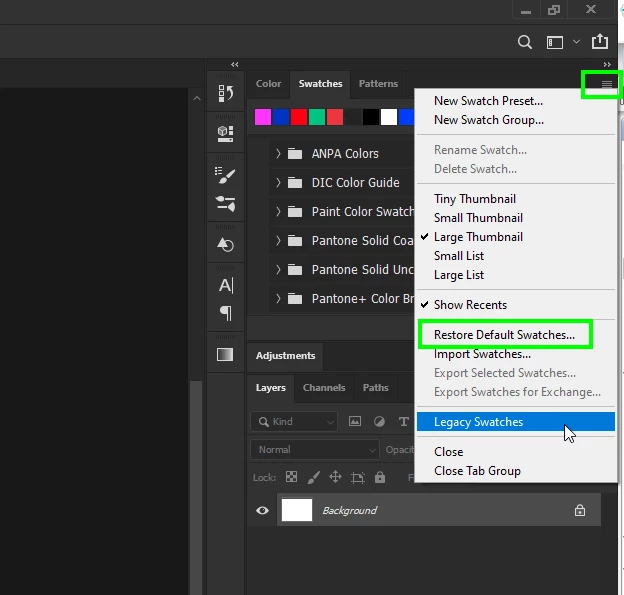
Try restoring default swatches and for the Pantone swatches choose legacy swatches

9 replies

c.pfaffenbichler
Community Expert
Community Expert
January 30, 2020

Why do you need them as swatches? 

Are the libraries not available when you click »Color Libraries« in the Color Picker? 

Correct answer
January 30, 2020

Hi

Try restoring default swatches and for the Pantone swatches choose legacy swatches

@Bobbafett
Participant
January 30, 2020

Hi Ged, That did it! Thanks so much!

January 30, 2020

You're welcome 🙂