A digital image file doesn't have a size. It only has pixels, so many pixels high by so many pixels wide.
Size is a derivative property, determined by pixel density, expressed as pixels per inch (ppi). It's not a native property of the file, just an instruction in metadata. The more you spread out your pixels, the lower the density / ppi number, and the bigger the size. It's a tradeoff.
For most purposes you want a certain pixel density, a minimum ppi number. For print, that's usually 150-300 ppi, but depending on viewing distance.
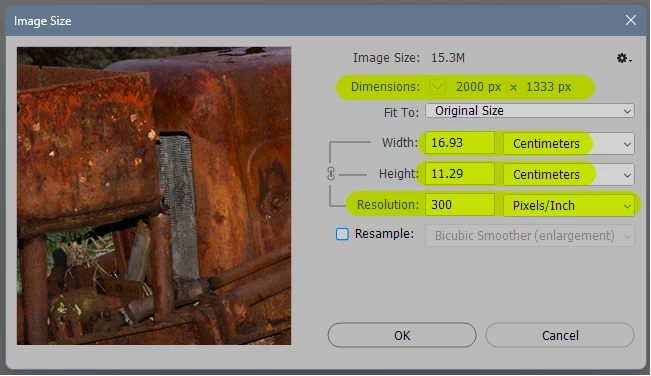
So what you do is open the Image Size dialog and look at the numbers. First of all, and this is crucial, uncheck "resample"! Now you can try different numbers to see what sizes are available with the pixels in the file, but without actually changing anything in the pixel data.
Here's an example:
The file is 2000 x 1333 pixels, and I decide I want a density of 300 ppi for this.
As you can see, the print size then becomes 16.93 x 11.29 centimeters:
It's possible to upsample and downsample, but while the latter is OK, the former is usually not. Quality will suffer because pixels need to be invented from nothing. Lots of people will probably suggest all kinds of clever AI-algorithms, but the principle is still the same: pixels need to be invented from nothing.




 AdChoices