
Inspiring
April 27, 2023
Answered

Enregistrer pour le Web (hérité)

  • April 27, 2023
  • 15 replies
  • 1601 views

Bonjour à tous,


J'ai un message d'erreur (cf. capture ci-dessous) qui m'empêche d'utiliser l'option d'export pour le web (hérité).
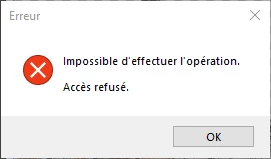
 

J'ai essayé pas mal de chose, mais en vain. La seule piste que j'ai trouvé et qui fonctionne est celle de la création d'un nouvel utilisateur Windows. L'export fonctionne correctement sur cet utilisateur nouvellement ajouté, mais pas sur celui d'où je travaille habituellement.


Peut-être un souci d'autorisation des utilisateurs sur les dossiers, mais j'ai également regardé de ce côté là et je n'ai rien réussi à en tirer...


Auriez-vous des idées ? 


Merci à tous,


Belle journée.


Photoshop (24.4.1)

Windows 10 Professionnel Version 22H2 (64 bits)

This topic is closed to new replies. Start a new post to keep the conversation going.
Correct answer Florent275692941rks

@CShubert


I finally found a solution ! I tried to reset the preference, but it didn't change anything. Instead, I deleted (made a backup before) all the Photoshop folders (I had one Adobe Photoshop 2022 and one Adobe Photoshop 2023 folder) located here : C:\Users\UserName\AppData\Local\Adobe.


After restarting PS, the files were generated back so I tried again the export option, and it worked !

Thank you again for your patience and your help !

15 replies

Florent275692941rksAuthorCorrect answer
Inspiring
April 28, 2023

@CShubert


I finally found a solution ! I tried to reset the preference, but it didn't change anything. Instead, I deleted (made a backup before) all the Photoshop folders (I had one Adobe Photoshop 2022 and one Adobe Photoshop 2023 folder) located here : C:\Users\UserName\AppData\Local\Adobe.


After restarting PS, the files were generated back so I tried again the export option, and it worked !

Thank you again for your patience and your help !

Participant
October 11, 2023

Bonjour,

j'ai exactement le même souci que Florent275692941rks

la fonctionnalité que j'utilise beaucoup "enregister pour le web" fait un message d'eureur car il y a un probleme de chemin.

j'ai fait beaucoup de chose mais rien ne fonctionne :

parametrer puis deactivé les  firewall,  supprimer le fichier "Save for Web" et reinitialiser les preférences manuellement, comme expliquer à Florent275692941rks en avril 2023 rien ne marche.

et re-installé plusieur fois photoshop

Pour info, j'ai aussi comme probleme l’erreur « Generator présente un problème » se produit au lancement de Photoshop".

je suis sur Windows 11 avec la version du cc de photoshop 2024 pouvez vous m'aider s'il vou plait

CShubert
Community Manager
Community Manager
April 28, 2023

Thank you for your patience on this.


Let's make sure we're in a default state and there are no stale settings somewhere: 

Restore your preferences using this manual method:  

https://helpx.adobe.com/photoshop/using/preferences.html#Manually 

Does it work correctly? 

If that doesn't solve it, you can quit Photoshop and put the Settings folder back. 


Inspiring
April 28, 2023

Hi @CShubert,


I deleted the "Save for Web Prefs.psp" file and restarted PS, but no changes.


Thank you,

CShubert
Community Manager
Community Manager
April 27, 2023

The team came back with this...


I wonder if it could be a problem with the Save for Web preferences file. Try deleting that.


"C:\Users\UserName\AppData\Roaming\Adobe\Adobe Photoshop 2023\Adobe Photoshop 2023 Settings\Save for Web Prefs.psp". Then restart Ps.


Inspiring
April 27, 2023

@CShubert I did restart PS, I also rebooted my computer and made the last Windows update.


I really don't know why it is doing that, but I have a feeling that is it about the user permissions, maybe I am wrong...


Thank you again.

CShubert
Community Manager
Community Manager
April 27, 2023

Thank you @Florent275692941rks to confirm, after you changed that, did you restart Ps?


Inspiring
April 27, 2023

@CShubert@Kevin Stohlmeyer,


Thank you.


I changed the memory to 70% instead of 100%, but it seems that the problem still occurs...

Kevin Stohlmeyer
Community Expert
Community Expert
April 27, 2023

@CShubert jinx!

Kevin Stohlmeyer
Community Expert
Community Expert
April 27, 2023

Hi @Florent275692941rks you cant run Photoshop with 100% available RAM. Change that setting back under Preferences/Performance to 70%.

CShubert
Community Manager
Community Manager
April 27, 2023

@Florent275692941rks one thing we see is you should set your memory for Ps to %70, not %100


Mémoire utilisée par Photoshop : 100 %