December 4, 2025
Answered

Entfernen Werkzeug funktioniert nicht

  • December 4, 2025
  • 3 replies
  • 282 views

Bei der Verwendung von dem Entfernungswezeug bekomme ich diese Meldung als popup eingeblendet: das "Werkzeug kann nicht verwendet werden, da die Aktivierung fehlgeschlagen ist"

Meine Hardware ist ein HP Omnibook mit Ultra 7 Prozessor.

Sonst läuft Photoshop perfekt.

 Wer kann mir bitte helfen.

Correct answer Ged_Traynor

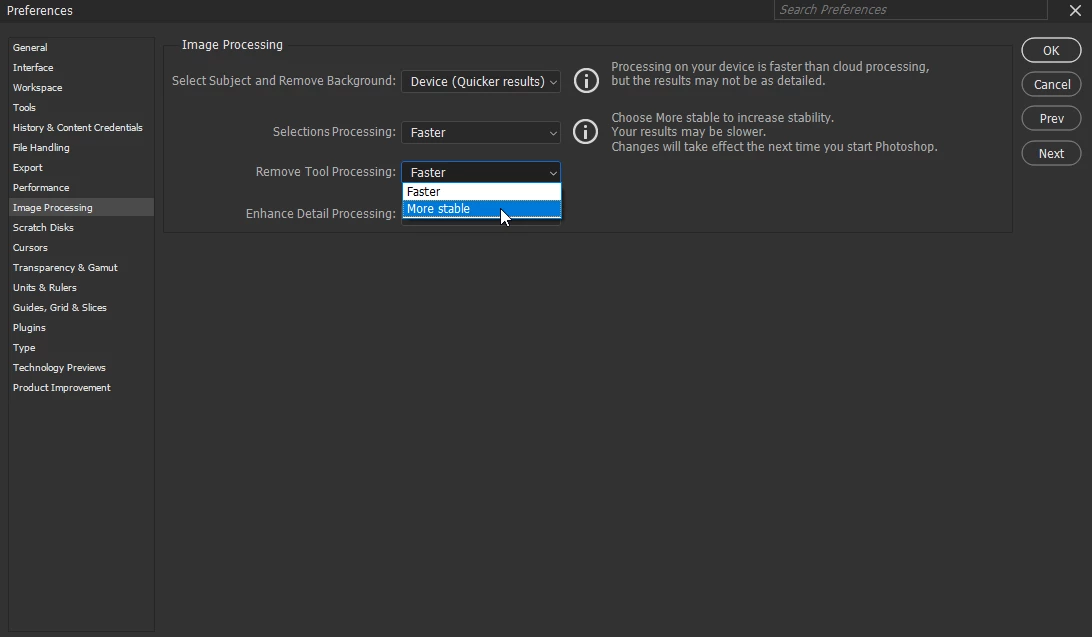
@G_G0873 try changing the remove tool from faster to more stable, as per this thread

https://community.adobe.com/t5/photoshop-ecosystem-discussions/photoshop-cant-use-the-tool-because-activation-failed/m-p/15543316

867895i4B55431458D53A6A.png

3 replies

Ged_Traynor
Community Expert
Ged_TraynorCommunity ExpertCorrect answer
Community Expert
December 5, 2025
G_G0873Author
December 5, 2025

Hallo,

many thanks, it works fine.

Kind regards

Claire H.
Community Manager
Community Manager
December 4, 2025

Hi @G_G0873, welcome to the Photoshop community forums! Let's try a few things to get you back to editing.

First, if you haven't already, please try manually resetting your Photoshop preferences: https://adobe.ly/4pnyFr9. Remember to back up your settings before doing the preference reset: https://adobe.ly/4pREQn7

If you're still experiencing this issue, we can continue to troubleshoot. I hope this helps! ^CH