Participant
October 8, 2023
Answered

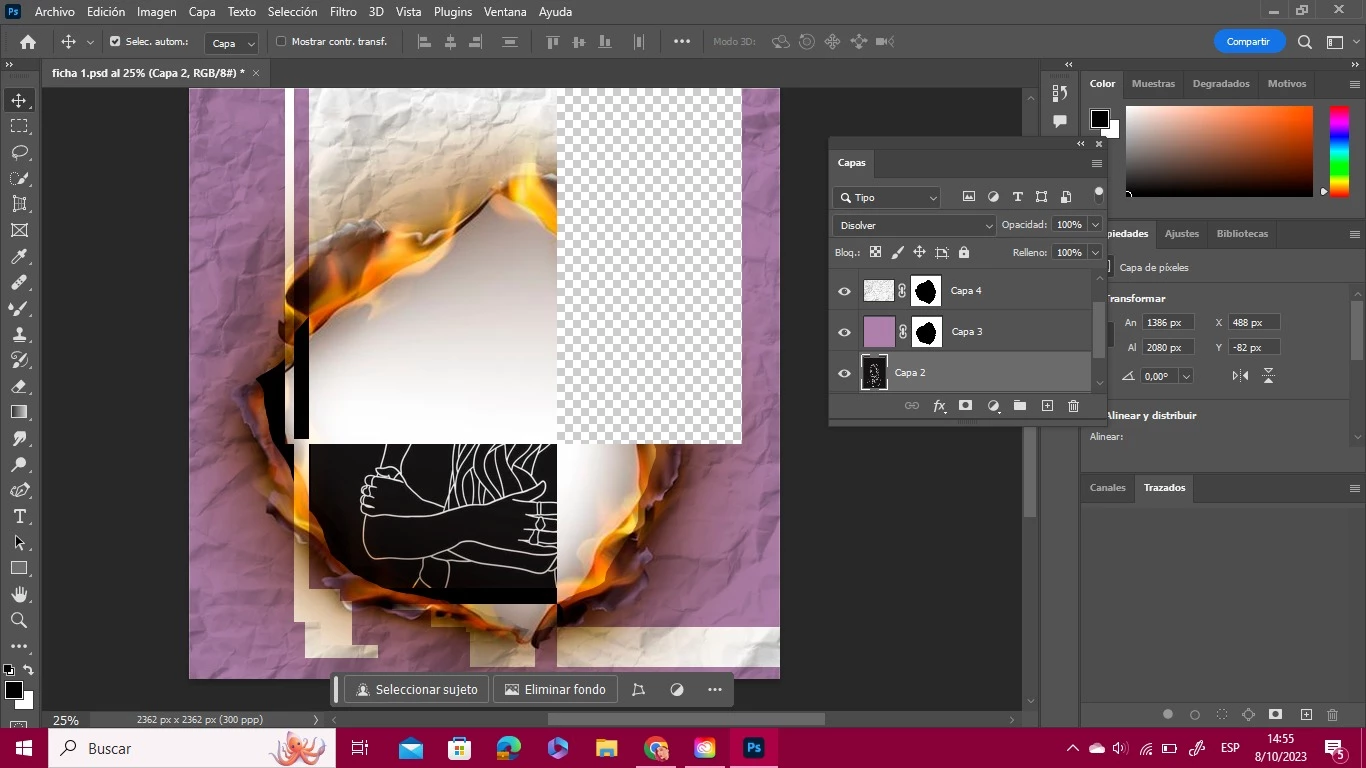
Error al mover las imagenes

  • October 8, 2023
  • 1 reply
  • 460 views

Hola, hace poco actualice mi photoshop y desde entonces cuando quiero mover una imagen se glitchea toda la imagen, imposibilitandome asi hacer los trabajos para la facultad. Necesito una solucion urgente

Ya probre reiniciando la computadora y todo eso. 

This topic has been closed for replies.
Correct answer Sameer K

Hey, @ALEJANDRO3278948261t4. I'll help you figure this out. Will move this to discussions for now.

What other troubleshooting steps have you tried?


As a basic step, Backup your presets & ensure Photoshop is in the default state, go to the location of the preference folder below, and rename it to backup. https://adobe.ly/3tqVnGG


  • Windows 10/11: Users/[user name]/AppData/Roaming/Adobe/Adobe Photoshop [version]
  • Press Windows + R & type this is the Run Window - %APPDATA%\Adobe

    SameerK_0-1686689907552.png


  • Rename the Adobe Photoshop folder by adding a .old at the end. (Adobe Photoshop 2024 > Rename > Adobe Photoshop 2024. old)


These changes will give a fresh start to Photoshop as a fresh install. Let me know if the issue exists.

Thanks!

Sameer K

1 reply

Sameer K
Community Manager
Sameer KCommunity ManagerCorrect answer
Community Manager
October 11, 2023

Hey, @ALEJANDRO3278948261t4. I'll help you figure this out. Will move this to discussions for now.

What other troubleshooting steps have you tried?


As a basic step, Backup your presets & ensure Photoshop is in the default state, go to the location of the preference folder below, and rename it to backup. https://adobe.ly/3tqVnGG


  • Windows 10/11: Users/[user name]/AppData/Roaming/Adobe/Adobe Photoshop [version]
  • Press Windows + R & type this is the Run Window - %APPDATA%\Adobe

    SameerK_0-1686689907552.png


  • Rename the Adobe Photoshop folder by adding a .old at the end. (Adobe Photoshop 2024 > Rename > Adobe Photoshop 2024. old)


These changes will give a fresh start to Photoshop as a fresh install. Let me know if the issue exists.

Thanks!

Sameer K