Participating Frequently
May 19, 2025
Answered

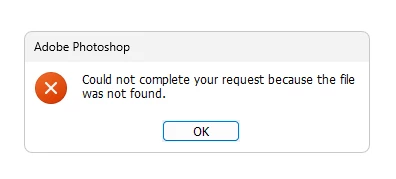
Error: Could not complete your request because the file was not found.

  • May 19, 2025
  • 1 reply
  • 5422 views

I get this error (Could not complete your request because the file was not found.) when I want to open photoshop. I first open photoshop this popup appears and when I press ok button then photoshop will close again.
I have searched on the internet and all suggest to reset preference, but how do I reset it while photoshop does not open at all, is there any solution for this error I get?


Correct answer Aleke

Hi @Aleke 


Apologies for the delay it’s been a week since my last update as I’ve been unwell and needed to rest.


Unfortunately, none of the suggestions you provided have resolved the issue. I’m sorry to report that.

When I renamed the "Adobe Photoshop 2025 Settings" folder and relaunched Photoshop, it did create a new default settings folder, but the issue still persists.
Even after reinstalling Photoshop and the Creative Cloud app, and renaming the Adobe folder in the Roaming directory, the problem remains unchanged.


All three options didn’t work.


Hi @LADALIDI! Thanks for the update.

At this point, it’s looking like the issue might be something very specific to your system. The error about a missing file could be tied to any number of things, and since this isn’t something we’re seeing widely reported, it’s likely something unique to your setup.


Based on everything you've tried so far, it seems like the problem might be coming from outside of Photoshop or the Adobe installation itself. It could be something in the system environment — maybe a font, a driver, a plugin, or another resource that’s causing trouble. If I were in your shoes, I might start thinking about a clean system reinstall, just to rule out anything deeper going on.


Do you happen to have access to another computer where you could test this? It would be really helpful to know if the same issue happens there. Also, is your system managed by you, or is it part of a larger setup like a company or school network?

Let’s keep digging — we’ll figure this out together.
Alek

1 reply

Community Manager
May 19, 2025

Hi @LADALIDI! Welcome to the community!

Sorry to hear you're running into trouble with Photoshop. Just to help us get a better idea of what might be going on, could you let us know which version you're currently using?


In the meantime, there’s actually a way to reset your preferences without needing to open Photoshop. You can find the step-by-step instructions here.  In case the link doesn't take you directly to the part I'm referring to, it's the section that says: "Manually restoring your preferences is the optimum way of resetting Photoshop to its default state [...]"


Hope this helps — let us know how it goes!

Cheers,
Alek

*(If you mention me with an @, like @Aleke, I’ll get a notification and can respond faster.)*

LADALIDIAuthor
Participating Frequently
May 24, 2025

Hi @Aleke , I'm using photoshop 2025, and I have updated today to version V.26.7 and there is no change, previously I have uninstalled and reinstalled it but that also did not solve the problem, still with the same error. I have also done the steps as in the link you provided but it still does not work.
I hope you can help me to fix it.

Thanks..

LADALIDIAuthor
Participating Frequently
May 24, 2025

As additional information, these are all the files and folders that are currently in the Photoshop settings folder.
thanks