Inspiring
May 21, 2026
Answered

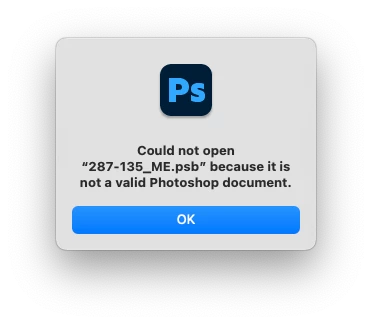
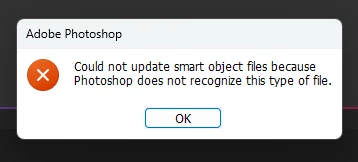
error message: could not update smart object files

  • May 21, 2026
  • 2 replies
  • 52 views

Hi, I tried to open a file and got this message, which I’ve never seen before.  This is a fairly old file which I’ve opened many times before.  Any idea why I’m getting this message and if there is anything I can do about it?  Thanks.  


    Correct answer c.pfaffenbichler

    Thank you! 

    Unfortunately the file might be damaged and I cannot open it. 


    One can use »Linked Smart Objects« to place external files (of certain file formats) in a Photoshop file. 

    That’s particularly useful when elements have to be used across multiple files, like different formats for example.

    But when editing those separate files one needs to make sure to update the Linked Smart Objects in all the affected files. 

    2 replies

    Inspiring
    May 25, 2026

    OK, thanks for trying, and for the information about Linked Smart Objects.  

    c.pfaffenbichler
    Community Expert
    Community Expert
    May 23, 2026

    Could you provide a file for testing? 

    Are the affected objects embedded or linked Smart Objects? 

    Inspiring
    May 25, 2026

    Thank you.  Here is a link to the file:  https://www.dropbox.com/scl/fi/v65yur6th85owqa8dapzj/287-135_ME.psb?rlkey=e1huuffws9eap61zmuju9b9rh&st=zluhbwec&dl=0


    I’m not sure what a “linked” Smart Object is, so I assume they’re embedded.  I created them by right clicking on the layer and choosing Smart Object.  It’s been awhile since I was in the file.

    c.pfaffenbichler
    Community Expert
    c.pfaffenbichlerCommunity ExpertCorrect answer
    Community Expert
    May 25, 2026

    Thank you! 

    Unfortunately the file might be damaged and I cannot open it. 


    One can use »Linked Smart Objects« to place external files (of certain file formats) in a Photoshop file. 

    That’s particularly useful when elements have to be used across multiple files, like different formats for example.

    But when editing those separate files one needs to make sure to update the Linked Smart Objects in all the affected files.