


Participant
Nov 5, 2025 9:11 AM UTC
Question

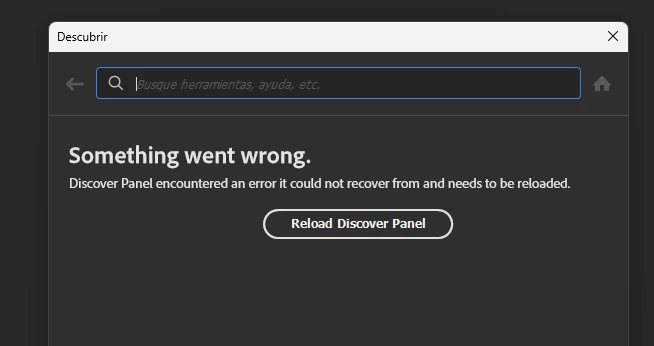
Error: Panel Descubrir no funciona en Photoshop v27.0

Error: Panel Descubrir no funciona en Photoshop v27.0.  aparece el error "Something went wrong. Discover Panel encountered an error..."  y ya has intentado borrar la configuración UXP sin éxito.
 

13 replies

Alondra MF
Participant
Apr 6, 2026 5:52 PM UTC

Yo tenia el mismo error, y se soluciono intalando la version en ingles de photoshop.
Literal hice de todo y nada funcionaba hasta que puse la interfaz en ingles. Supongo que no entiende bien el español la seccion de descubrir. Pero luego luego hice eso y todo funciono como debia. 

Translate
Alondra MF
Participant
Apr 6, 2026 5:51 PM UTC

Yo tenia el mismo error, y se soluciono intalando la version en ingles de photoshop.
Literal hice de todo y nada funcionaba hasta que puse la interfaz en ingles. Supongo que no entiende bien el español la seccion de descubrir

Translate
CMass
Community Manager
Community Manager
Apr 6, 2026 11:24 PM UTC

Hey  ​@Alondra MF, 

Thank you for sharing your workaround. Which is not ideal. May I ask what version you were using when it didn’t work as well as which version did end up working?

^CMass

Translate
josantgomez
Legend
Nov 14, 2025 1:09 AM UTC

Es cierto que esto no responde a la pregunta concreta en este lugar. Pero está relacinado con otras publicaciones que he hecho en relación a este problema. 

Por tanto es oportuno reflejarlo. Y si lo enlacen en lo que yo publique´pues sería de agradecer. Pero ahora notengo tiempo de estar buscando dónde demonios está el hilo mencionado. Pero Adobe, sí.


Translate
Sameer K
Community Manager
Community Manager
Nov 5, 2025 10:11 AM UTC

Hey, @Juan Enrique24261143z1ww. Welcome to the Photoshop Community. I'll need more info to help you figure this out. Please share screenshots & the system info from Photoshop Help > System info > Copy & paste into a text document > upload & attach here.


Head to the content here and scroll to the Open in Photoshop button at the bottom: https://adobe.ly/3JIxPp4


Please check if the issue exists if you launch Photoshop via the Creative Cloud desktop app. I've moved your post to discussions for now. 


Thanks!
Sameer K

(Type '@' and type my name to mention me when you reply)

Translate
Participant
Nov 5, 2025 10:40 AM UTC


Aquí tienes el pantallazo del error, tambien te he adjuntado la información del sistema.

Respecto a lo de abrirlo econ Creative Cloud , no ha funcionado, seguia dando el mismo error. 

Con la pruebas del botón : Open in Photoshop" del enlace: https://adobe.ly/3JIxPp4 tampoco ha funcionado.

Translate
Myra Ferguson
Community Expert
Community Expert
Oct 8, 2025 3:00 PM UTC

Does it reload if you click the Reload Discover Panel button?

Translate
Participant
Oct 8, 2025 3:23 PM UTC

Hola, al apretar el botón de reload se cierra la ventana y no vuelve a abrir, al apretar "ver más" en Acciones Rápidas vuelve a aparecer con el error 😞

Translate
Myra Ferguson
Community Expert
Community Expert
Oct 8, 2025 3:56 PM UTC

Try signing out and signing back in via the Help menu.

Translate
Participant
Oct 8, 2025 2:19 PM UTC

Hola! Desde la última actualización de PS la ventana descubrir me aparece con el mensaje "Something went worng" a alguien mas le ocurre? tengo la última versión de PS y uso sistema operativo Win11. Si alguien sabe como solucionarlo, por favor ayuda! 


Dejo captura de la ventana

Translate