
Participant
October 22, 2020
Answered

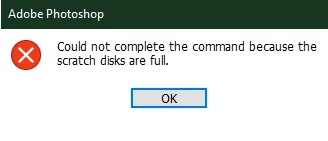
Error scratch disk full

  • October 22, 2020
  • 2 replies
  • 594 views

I tried to make a 1920x1080 HD image but it keeps giving me the error of "scratch disk full". I googled it and i allocated 12GB of memory to photoshop and i have 400GB of storage free and i do not know why i still get the error.
 

This topic has been closed for replies.
Correct answer Test Screen Name

Check your New Document setting are 1920 x 1080 pixels. Not inches or mm. common cause of this issue on New. 

2 replies

Participant
March 8, 2024

This is super late, but for anyone else who runs into this issue...Similar thing happened to me. Do you make new files by pixel size or by inches? I usually go by pixels (ex: 2500x3000 or something like that), but I apparently I had accidentally switched to inches and it would only let me max the numbers to 1000.


Went back to pixels and it all worked out! Here is a short guide that helped me. 

https://customstickers.com/community/blog/how-to-fix-scratch-disk-errors-in-photoshop 

Test Screen NameCorrect answer
Legend
October 22, 2020

Check your New Document setting are 1920 x 1080 pixels. Not inches or mm. common cause of this issue on New. 

Participant
October 22, 2020

That worked but i had to re-install it for some reason.