

DP Artes digitais
Participant
March 18, 2026
Answered

Error while selecting Subject using Quick Selection tool in Photoshop “Could not locate an object to be selected”

  • March 18, 2026
  • 4 replies
  • 114 views

Em ferramenta de seleção rápida > selecionar assunto > Erro: Erro não foi possível localizar um objeto a ser selacionado. Talvez não haja objetos proeminentes na imagem.

In the quick selection tool > select the subject > Error: Error: Could not locate an object to be sealed. There may not be any prominent objects in the image.
    Correct answer Ged_Traynor

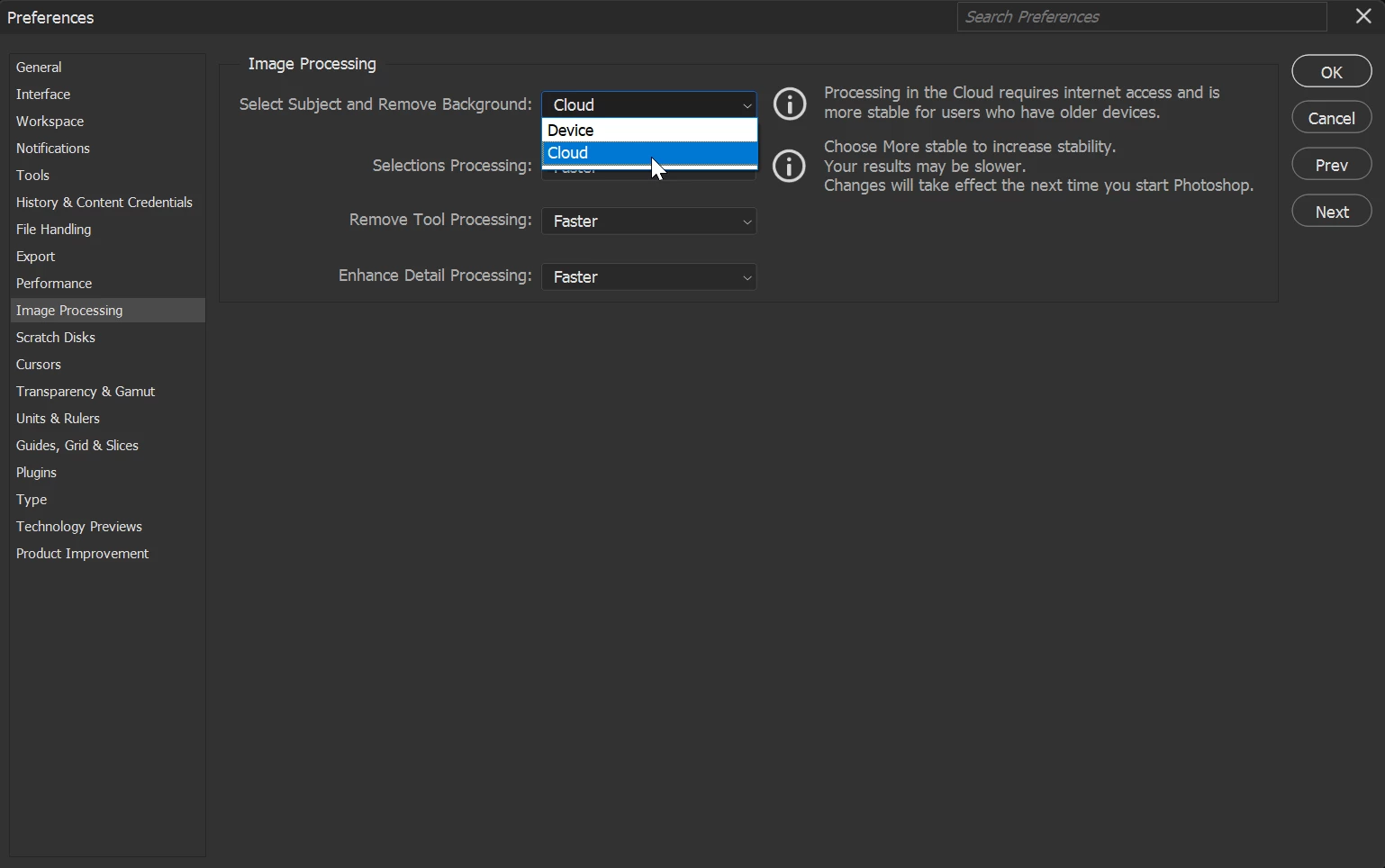
    @DP Artes digitais try setting this option to cloud in the preferences to see if it helps


    4 replies

    Alpha Daniel
    Participant
    March 28, 2026

    thank you working Fine

    CMass
    Legend
    March 18, 2026

    Hey @juan_camilo_7521

    Thank you for reaching out! I tested one of the screenshots you shared and was able to select a subject without any issues, so it may not be related to the file. For now, I’ll move your posts into the Questions section until we can gather more details on how to reproduce the issue.

    479fFFP


    Sometimes this can be system-related. To check, could you please share your system information? You can find it by going to Help > System Info. Please copy and paste that into your response, along with a sample file.


    ^CM

    Participating Frequently
    March 18, 2026

    Hello ​@CMass 


    Thank you so much for your reply! I started checking some options, I went to Edit > Preferences > Image Processing, and in the section  "select subject and remove background," it was set to "Device." That's where the error was occurring. I changed it to "Cloud," and the selection works.


    I've always use "Devices" for many time, never the cloud. Why is it failing now? How can I fix it? I don't want to use the cloud, since, as the warning within Photoshop itself states, the cloud is only for older computers that can't handle the task properly. I currently have an Intel i7 12700 with an RTX 5070 graphics card and 32 GB of RAM, so it should work with the option set to "Devices."

    Sameer K
    Community Manager
    Community Manager
    March 19, 2026

    Thanks for adding the details. Your machine has two GPUs. Please follow the steps in the content here to configure the default GPU for Photoshop: 


    2 - Go to the location of the preference folder below and rename it to backup.

    • Windows 10/11: Users/[user name]/AppData/Roaming/Adobe/Adobe Photoshop [version]/Adobe Photoshop [version] Settings
    • You can press Press the Windows key > Enter 'Run' > Enter %APPDATA%\Adobe
    • Rename the Adobe Photoshop folder by adding a .old at the end. (Adobe Photoshop 2026 > Rename > Adobe Photoshop 2026. old), You can restore these preferences later if needed.(https://adobe.ly/4860qM9)
    • Restart the computer.

    Let me know how it goes.

    Thanks!
    Sameer K
    (Type '@' and type my name to mention me when you reply)

    Participating Frequently
    March 18, 2026

    Hello


    Automatic subject select doesnt' work for me, It was working fine a few days ago, but suddenly the automatic selection stopped working.

    I'm using Windows 11 and the latest version of Photoshop (27.4). This happened with a photo I took of a person against a white background using a Canon T7i. Then I opened high-resolution images from the internet with a white background and a person, and the error persists. It says, "Could not find a selectable object. There may not be a highlighted object in the image," even when the person is wearing dark clothing against the white background.


    Ged_Traynor
    Community Expert
    Ged_TraynorCommunity ExpertCorrect answer
    Community Expert
    March 18, 2026

    @DP Artes digitais try setting this option to cloud in the preferences to see if it helps


    DP Artes digitais
    Participant
    March 18, 2026
    Thanks for the tip! The cloud option was already listed, I changed it to device and it solved the problem. Thanks, friend.