

Thales38552905j8j7
Participant
April 14, 2026
Question

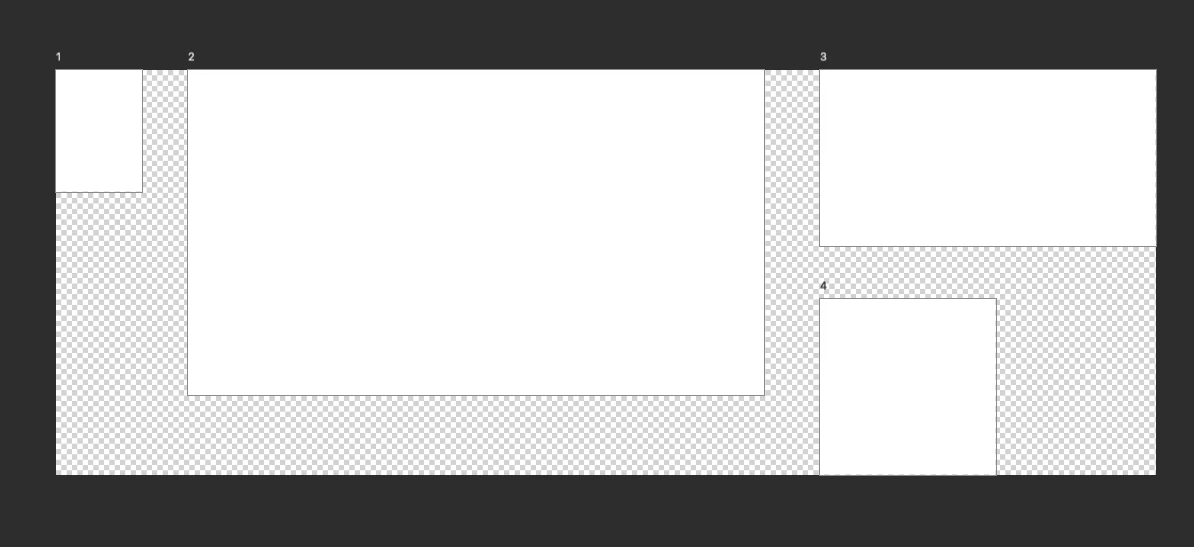
Estou com um bug no Photoshop relacionado às pranchetas.

  • April 14, 2026
  • 2 replies
  • 114 views

Estou com um bug no Photoshop relacionado às pranchetas. Ao criar, duplicar ou editar pranchetas, passam a aparecer áreas brancas/transparente fora delas, como se o canvas estivesse sendo exibido/renderizado de forma incorreta. Antes isso não acontecia no mesmo arquivo e fluxo de trabalho. Já testei reinstalação, reset de preferências, atualização do Photoshop e do macOS, e o problema continua, sem mensagem de erro.


    2 replies

    Srishti Bali
    Community Manager
    Community Manager
    June 26, 2026

    Hi ​@Thales38552905j8j7 


    Thanks for sharing these details. Could you please provide a full screenshot of your Photoshop application, along with the System Info from the Help > System Info menu?

    To do this:

    1. Open Photoshop.
    2. Go to Help > System Info.
    3. Copy the entire report and paste it here.

    Also, if this is happening with any specific file, please share the sample file as well. This information will help us investigate the issue more thoroughly.

    Thanks, Srishti Bali | Community & Engagement Strategist, Digital Imaging | Adobe
    creative explorer
    Community Expert
    Community Expert
    April 27, 2026

    @Thales38552905j8j7 has this issue been resolve for you? If not, what version and operating system are you using?

    m
    Thales38552905j8j7
    Participant
    May 13, 2026

    Ainda não. 

    macOS Tahoe Versão 26.4.1

    Sameer K
    Community Manager
    Community Manager
    June 4, 2026

    Hey, ​@Thales38552905j8j7. Thanks for sharing the details. Sorry for the delay in getting to this post. Has this started since a recent update? 

    There have been a stable release for Photoshop v27.7, available via the Creative Cloud desktop app. 
    Please update and let me kno whow it goes. 

    Thanks!
    Sameer K