


Inspiring
November 4, 2025
Question

Even small files I create now must be saved as .PSB

  • November 4, 2025
  • 3 replies
  • 285 views

I have a file with 11 layers and no images. 
The size is 1920 x 1080 (72DPI)

When I try to save it, Photoshop forces me to save it in Large Format.


I looked at the image size box and saw something strange.
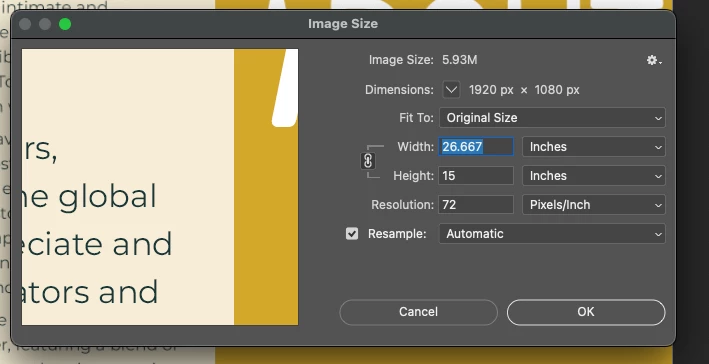
 

The dimensions are 1920x1080 and the image size indicates 5.93M
BUT the width and height are listed as 26.67 x 15 inches. 

I don't understand this.

3 replies

Genius
November 4, 2025

Simple math tells us that 26.6667" x 72 pixels per inch = 1920 pixels, likewise the other dimension.


A 6MB image can be saved in TIFF, PSD, or PSB formats. I don't see how you could add enough layers and objects to make it over 2GB.

kd360Author
Inspiring
November 6, 2025

The file has 13 layers and those layers consist of shapes or text (no images). Reveal all shows a size of 2860x2049 at 72 ppi. Not nearly enough to make it over 2GB.

jane-e
Community Expert
Community Expert
November 6, 2025
quote

Reveal all shows a size of 2860x2049 at 72 ppi. Not nearly enough to make it over 2GB.

By @kd360


When you look at the psb in Finder, what size does it show in GB?


Are any of the layers smart objects?


Jane


Stephen Marsh
Community Expert
Community Expert
November 4, 2025

What is the canvas size if you use the Image > Reveal All command? Does it change from 1920x1080px?


BTW, Its not DPI, it's PPI as digital images are created from pixels, not dots, but regardless, it's the pixel width and height that is critical, not the print size of the image based off the pixel density (PPI).


The bit depth of the image is also a contributing factor., as are the numbers of layers, their type and alpha channel count.

kd360Author
Inspiring
November 6, 2025

Interesting. When I select reveal all it shows a resolution of 2860x2049 at (72ppi). This still should not be a 2GB file though.

Stephen Marsh
Community Expert
Community Expert
November 4, 2025

@kd360 


What do you see when you go to File > File Info: Raw Data - please post a screenshot.

kd360Author
Inspiring
November 6, 2025

Sorry for my delayed response. Here is the raw data file.


x:xmpmeta xmlns:x="adobe:ns:meta/" x:xmptk="Adobe XMP Core 9.1-c003 79.9690a87fc, 2025/03/06-20:50:16 "> <rdf:RDF xmlns:rdf="http://www.w3.org/1999/02/22-rdf-syntax-ns#"> <rdf:Description rdf:about="" xmlns:xmp="http://ns.adobe.com/xap/1.0/" xmlns:dc="http://purl.org/dc/elements/1.1/" xmlns:photoshop="http://ns.adobe.com/photoshop/1.0/" xmlns:xmpMM="http://ns.adobe.com/xap/1.0/mm/" xmlns:stEvt="http://ns.adobe.com/xap/1.0/sType/ResourceEvent#" xmlns:tiff="http://ns.adobe.com/tiff/1.0/" xmlns:exif="http://ns.adobe.com/exif/1.0/"> <xmp:CreatorTool>Adobe Photoshop 26.10 (Macintosh)</xmp:CreatorTool> <xmp:CreateDate>2025-11-02T17:29:37-05:00</xmp:CreateDate> <xmp:ModifyDate>2025-11-04T13:56:05-05:00</xmp:ModifyDate> <xmp:MetadataDate>2025-11-04T13:56:05-05:00</xmp:MetadataDate> <dc:format>application/vnd.adobe.photoshop</dc:format> <photoshop:ColorMode>3</photoshop:ColorMode> <photoshop:ICCProfile>Display</photoshop:ICCProfile> <photoshop:TextLayers> <rdf:Bag> <rdf:li rdf:parseType="Resource"> <photoshop:LayerName>SL PES26</photoshop:LayerName> <photoshop:LayerText>SL PES26</photoshop:LayerText> </rdf:li> <rdf:li rdf:parseType="Resource"> <photoshop:LayerName>Please join us for Slopes 2026 - an intimate and collaborative</photoshop:LayerName> <photoshop:LayerText>Please join us for 026 - an intimate and collaborative endeavor to challenge the existing norms and re-shape the future through vibrant discussions and exchange of diverse perspectives. Together, we will pave the way for a new era of innovation with intention. Over the evolution of Slopes, we have curated a community for our closest and most dynamic relationships, uniting global CEOs, entrepreneurs, changemakers, creators, and investors across the global digital economy. In today's landscape, we appreciate and recognize the paramount significance of innovators and seek to underscore the value of innovating with intention. These carefully crafted few days are aimed to maximize the quality time we spend together, featuring a blend of winter activities, in-depth thematic exploration, top-tier music, culinary delights, and entertainment experiences from around the world. We hope you can join us on this transformative journey.</photoshop:LayerText> </rdf:li> <rdf:li rdf:parseType="Resource"> <photoshop:LayerName>ABOUT</photoshop:LayerName> <photoshop:LayerText>ABOUT</photoshop:LayerText> </rdf:li> <rdf:li rdf:parseType="Resource"> <photoshop:LayerName>AGENDA</photoshop:LayerName> <photoshop:LayerText>AGENDA</photoshop:LayerText> </rdf:li> <rdf:li rdf:parseType="Resource"> <photoshop:LayerName>ACTIVITES</photoshop:LayerName> <photoshop:LayerText>ACTIVITES</photoshop:LayerText> </rdf:li> <rdf:li rdf:parseType="Resource"> <photoshop:LayerName>RSVP</photoshop:LayerName> <photoshop:LayerText>RSVP</photoshop:LayerText> </rdf:li> <rdf:li rdf:parseType="Resource"> <photoshop:LayerName>ABOUT</photoshop:LayerName> <photoshop:LayerText>ABOUT</photoshop:LayerText> </rdf:li> </rdf:Bag> </photoshop:TextLayers> <xmpMM:InstanceID>xmp.iid:846fdc47-06b7-4d0e-973d-d4a3c9eb3cd4</xmpMM:InstanceID> <xmpMM:DocumentID>xmp.did:9a918c88-4934-4871-9f40-eb6010f5ae98</xmpMM:DocumentID> <xmpMM:OriginalDocumentID>xmp.did:9a918c88-4934-4871-9f40-eb6010f5ae98</xmpMM:OriginalDocumentID> <xmpMM:History> <rdf:Seq> <rdf:li rdf:parseType="Resource"> <stEvt:action>created</stEvt:action> <stEvt:instanceID>xmp.iid:9a918c88-4934-4871-9f40-eb6010f5ae98</stEvt:instanceID> <stEvt:when>2025-11-02T17:29:37-05:00</stEvt:when> <stEvt:softwareAgent>Adobe Photoshop 26.10 (Macintosh)</stEvt:softwareAgent> </rdf:li> <rdf:li rdf:parseType="Resource"> <stEvt:action>saved</stEvt:action> <stEvt:instanceID>xmp.iid:846fdc47-06b7-4d0e-973d-d4a3c9eb3cd4</stEvt:instanceID> <stEvt:when>2025-11-04T13:56:05-05:00</stEvt:when> <stEvt:softwareAgent>Adobe Photoshop 26.10 (Macintosh)</stEvt:softwareAgent> <stEvt:changed>/</stEvt:changed> </rdf:li> </rdf:Seq> </xmpMM:History> <tiff:Orientation>1</tiff:Orientation> <tiff:XResolution>720000/10000</tiff:XResolution> <tiff:YResolution>720000/10000</tiff:YResolution> <tiff:ResolutionUnit>2</tiff:ResolutionUnit> <exif:ColorSpace>65535</exif:ColorSpace> <exif:PixelXDimension>1920</exif:PixelXDimension> <exif:PixelYDimension>1080</exif:PixelYDimension> </rdf:Description> </rdf:RDF> </x:xmpmeta>

Stephen Marsh
Community Expert
Community Expert
November 6, 2025

I asked for a screenshot, not a text dump.


I don't think that it's a case of excessive photoshop:DocumentAncestors metadata.


https://prepression.blogspot.com/2017/06/metadata-bloat-photoshopdocumentancestors.html