

Participating Frequently
September 16, 2026
Question

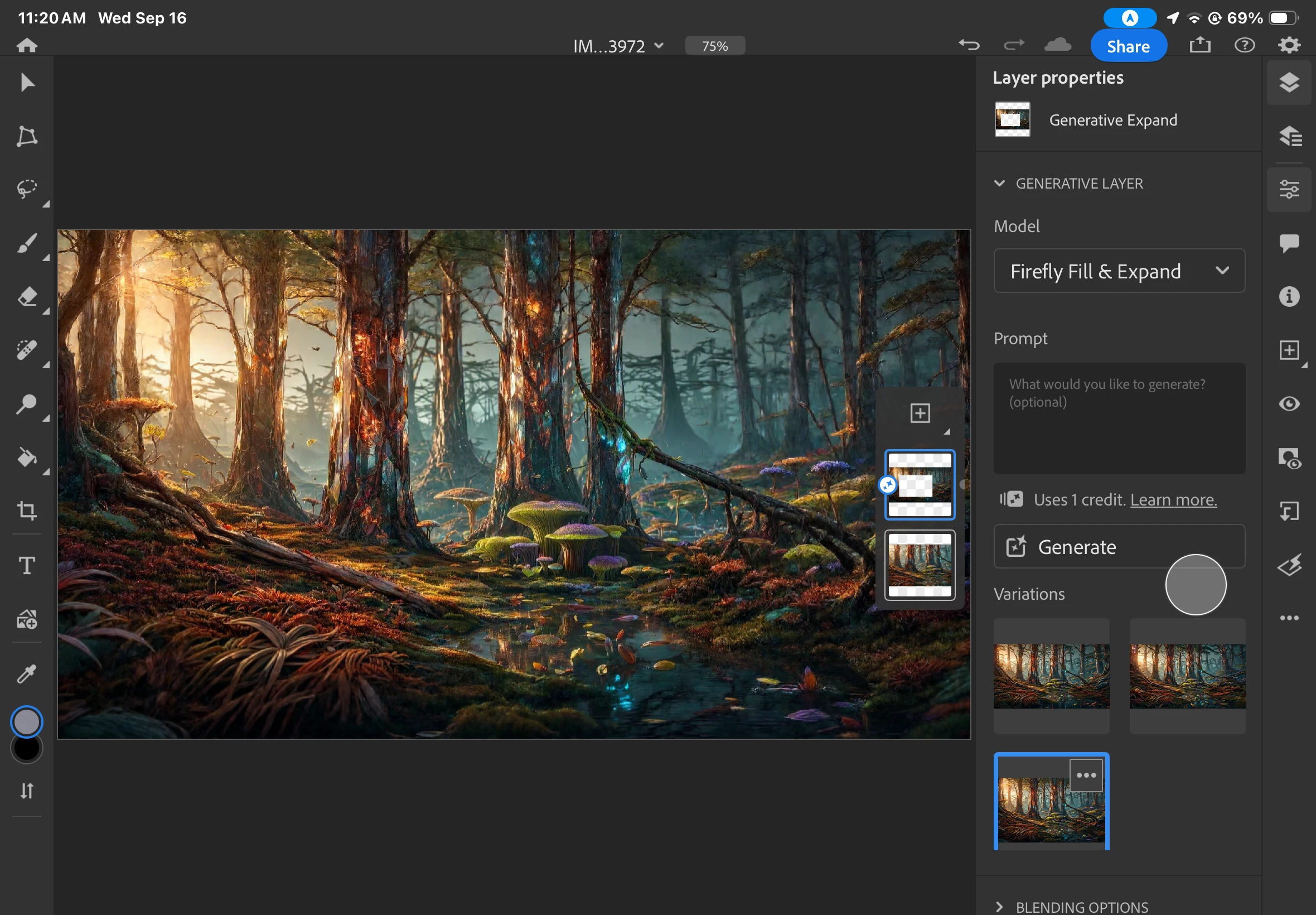
Ever since the latest upgrade these small icons intrude :(

  • September 16, 2026
  • 2 replies
  • 40 views

To better explain the situation, I will attach a screenshot. This is rather annoying and I don’t know how to move the small tiles out of the main workspace. There at the right side.



    2 replies

    Conrad_C
    Community Expert
    Community Expert
    September 16, 2026

    It’s not clear from your description whether you mean the compact Layers list, the Variations thumbnails, or something else. But you can hide or show any of it at any time. The small thumbnails over the image are a compact version of the Layers list. Tap the panel selection icons on the right to switch which ones are visible, as shown in the demo below. You can view the layers as a full width list, or hide the layer list completely.

    If you want to hide the compact layer list, tap the top icon along the right edge.


    Claire H.
    Community Manager
    Community Manager
    September 16, 2026

    Hi ​@Krystal38908904blzl, Welcome to the Photoshop Community forum! To better help you with this issue, we would like a few more details. Which version of Photoshop are you using, and what is your OS information? Thanks!^CH